GroceryKit: White-Label Grocery Delivery App Source Code (Flutter + Medusa v2)
GroceryKit is a multi-tenant grocery delivery platform with a Flutter customer app for iOS and Android, a web store, and admin, clerk, picker and driver dashboards on a Medusa v2 backend. It handles sold-by-weight products, substitutions, delivery polygons, multiple regions and currencies, and English/Arabic RTL.
Screenshots
About this product
Grocery delivery looks simple from the outside, but the software behind it is not. Produce is sold by weight, pickers swap out-of-stock items, every branch delivers to a different area, and prices, fees and payment providers change from country to country. Most grocery app templates stop at a storefront and a cart, so the hard part (picking, substitutions, delivery zones, staff roles) is left for the buyer to build.
GroceryKit is a white-label, multi-tenant grocery delivery platform that covers that whole flow. It combines a Medusa v2 backend with Flutter apps: a customer app for iOS and Android, a web store, and an admin, clerk, picker and driver dashboard. The seller built it to run many independent grocery businesses from one backend and one database, so an agency can launch a new branded grocery client by changing settings, icons and text rather than rebuilding the stack.
Features
Customer app and web store
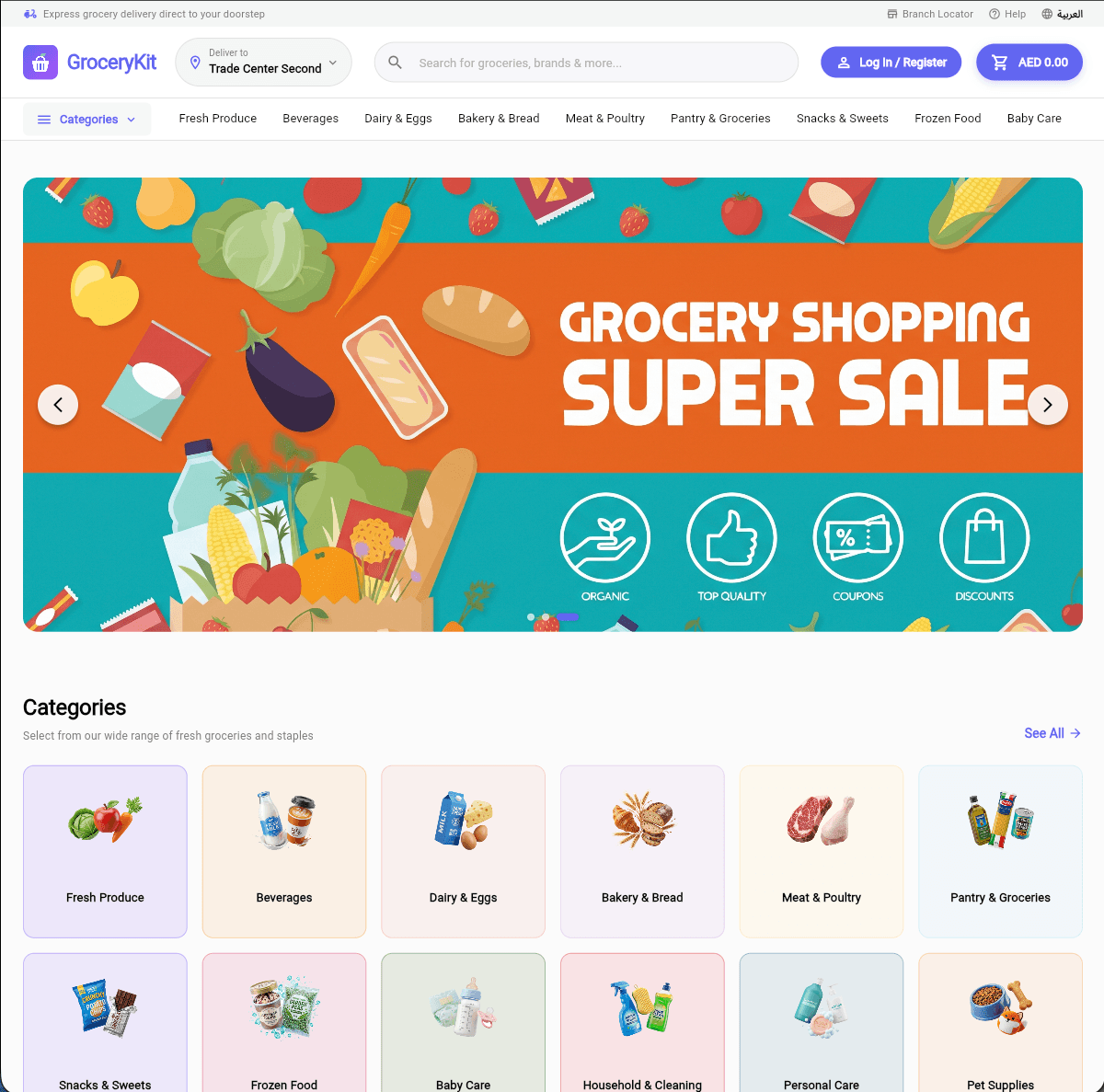
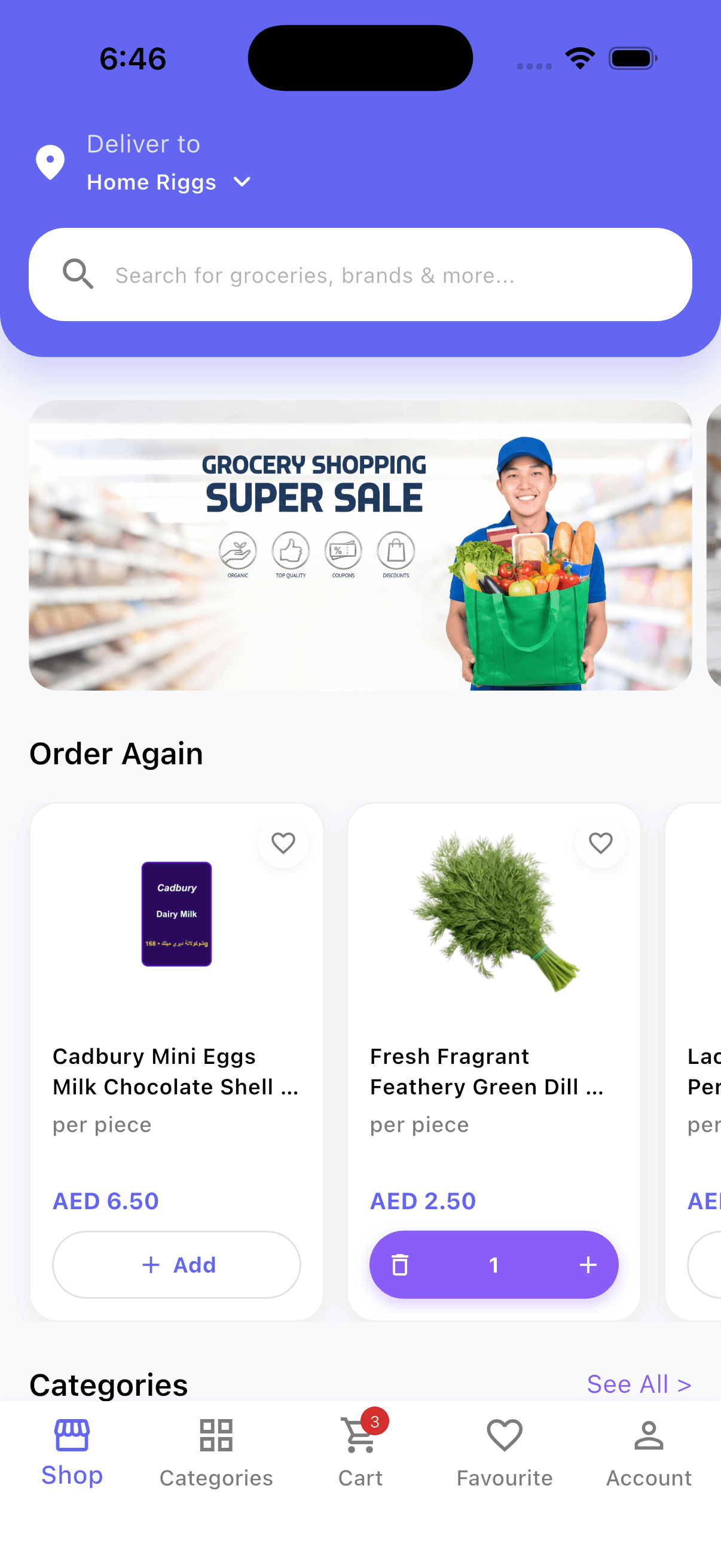
- "Deliver to" address picker, product search ("Search for groceries, brands & more") and promotional banner sliders
- Home sliders such as Order Again, On Sale Now, Best Sellers and custom product ranges
- Category grid (fresh produce, dairy, bakery, meat, frozen, household, pet supplies and more), brands and favourites
- Cart, branch-based delivery, saved addresses and cards, order tracking and push notifications
- English and Arabic with right-to-left layout; the web store shows a branch locator and language switch
Sold-by-weight products
- Each product is sold by the piece ("Each") or by weight ("Grams"), with weight steps such as 250 g or 500 g
- Price per kg and weight shown in the cart, product page and order, with a "Sold by weight" badge
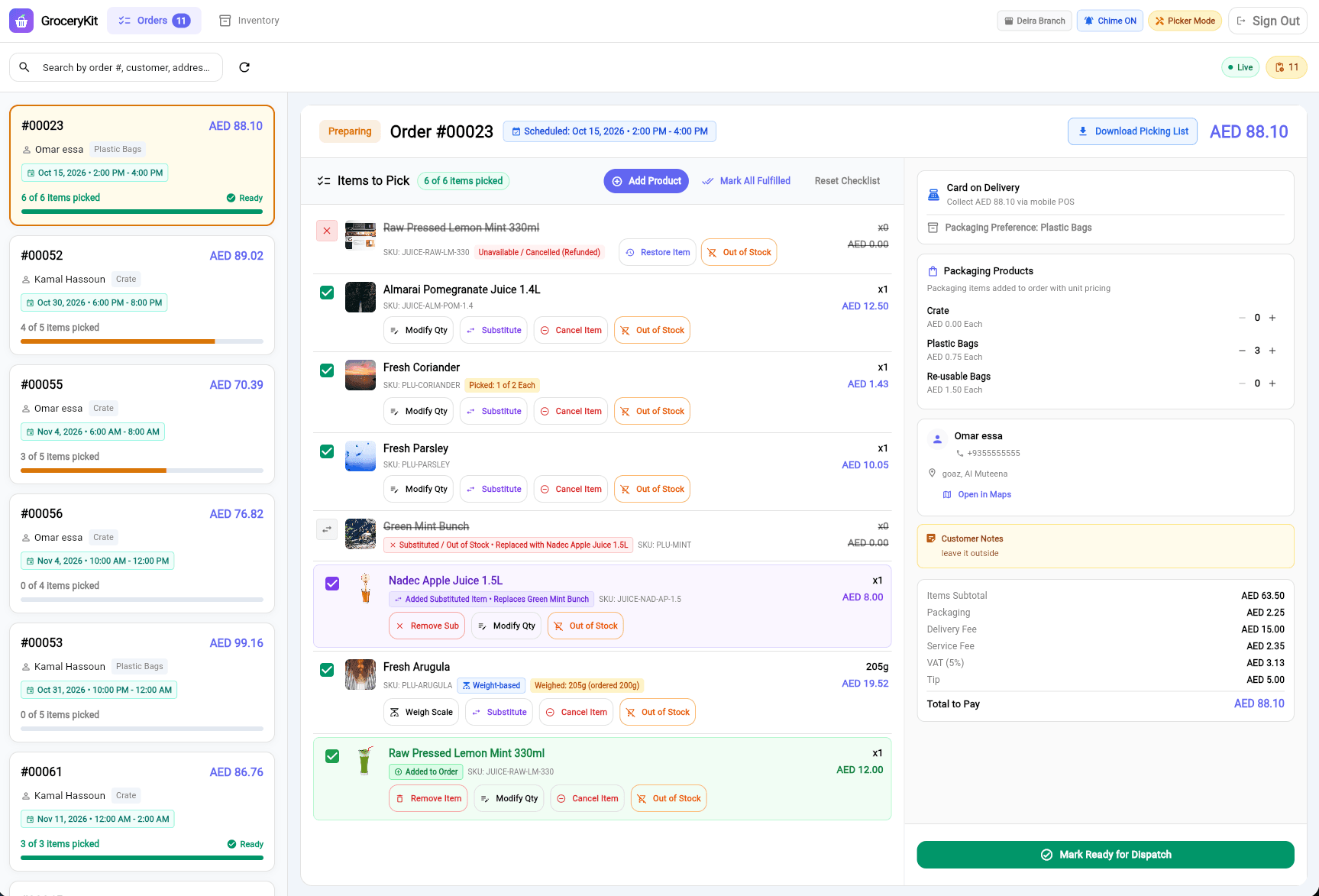
- Pickers enter the real picked weight and the line price is recalculated (the picker screen shows "Weighed: 205g (ordered 200g)")
- Invoice PDFs show weights in g or kg and pieces as counts
Orders hub and clerk mode
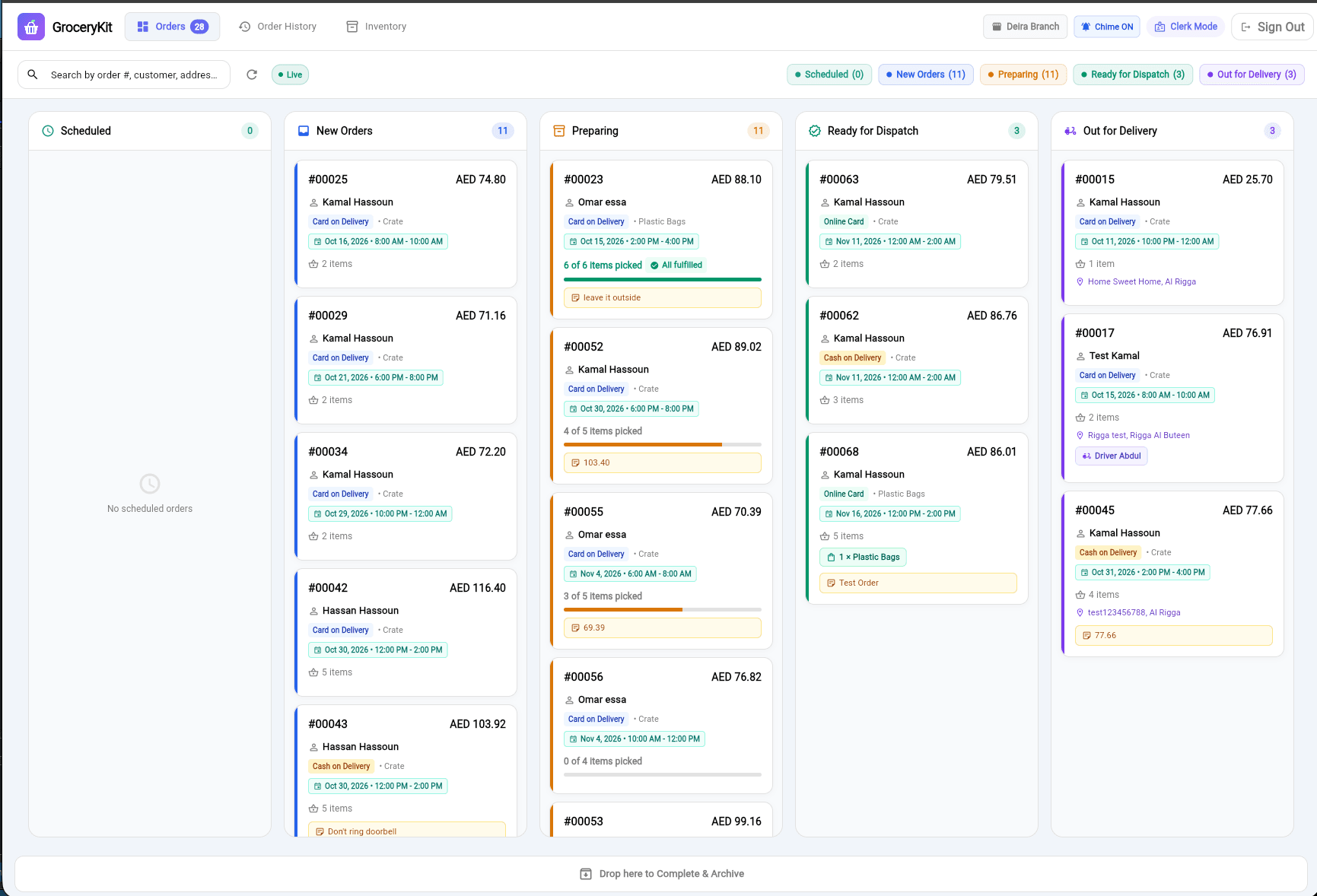
- A live kanban board per branch: Scheduled, New Orders, Preparing, Ready for Dispatch and Out for Delivery
- Order cards show the customer, payment type (card on delivery, cash on delivery, online card), packaging choice, delivery slot, picking progress and customer notes
- Order history, inventory and an audible "Chime" alert for new orders
Picker mode
- Per-order picking checklist with Modify Qty, Weigh Scale, Substitute, Cancel Item and Out of Stock actions
- Add products to an order, restore items, mark all fulfilled and download a picking list
- Packaging products (crates, plastic bags, reusable bags) priced per unit
- Totals broken down into items, packaging, delivery fee, service fee, VAT and tip, then Mark Ready for Dispatch
Driver view
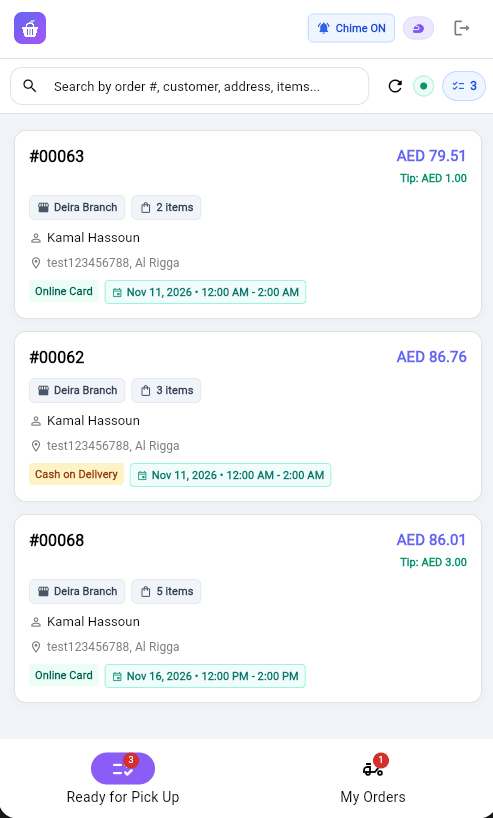
- Mobile-sized driver screen with Ready for Pick Up and My Orders tabs
- Each order shows branch, item count, address, delivery slot, payment type and tip
Admin dashboard and platform console
- Sales overview per region and currency (the demo shows UAE in AED and Kuwait in KWD): orders, revenue, median delivery time, cancellation rate, packaging revenue, delivery and service fees, tips and VAT
- Alerts for orders waiting too long, plus per-branch status, online clerks/pickers and stock in/out
- Menus for Orders Hub, payment check, branches, products and stock, categories, ranges, brands, promotions, push notifications, CMS, customers, staff and roles, analytics and reports, delivery settings, checkout settings and app status
- A platform console on the Medusa admin to create businesses and branches (with a map and delivery polygons), create each business's first super admin, set monthly message limits, watch usage and follow a setup checklist
Multi-tenant and multi-region
- Each business has its own branding, catalogue, branches, delivery zones, staff and customers, separated by a tenant header checked on every read and write
- Regions with their own currency and per-region product prices, rounded to the currency's decimals
- Per-business, per-region delivery, packaging, service fee, tips, payment methods and payment provider; payment keys stored encrypted
- Branch opening hours and delivery polygons, so an address is only served where a branch delivers
Who it is for
- Agencies and developers who want to launch grocery delivery apps for several clients from one codebase
- Grocery chains and supermarkets that want branded iOS, Android and web ordering with in-store picking
- Entrepreneurs starting a quick-commerce or online grocery business in one or more countries
How it works
- The platform owner creates a business, its regions, branches and delivery polygons in the platform console.
- The business adds products (by piece or by weight), prices per region, promotions and home layout.
- Shoppers order through the iOS/Android app or the web store and choose a delivery slot.
- Clerks see the order in the Orders Hub; pickers pick, weigh, substitute and mark it ready for dispatch.
- Drivers collect the order, deliver it, and the dashboard reports revenue, fees and delivery times.
Ways to monetize
An agency can sell or license branded grocery apps to multiple clients and charge setup and monthly fees. A single operator earns from product margins, delivery fees, service fees, packaging charges and promotions.
Technology
Flutter · Dart · Riverpod · Medusa v2 · Node.js · TypeScript · PostgreSQL · Firebase
What you get
- Medusa v2 backend with custom modules for home layout, app status, messaging and usage
- Flutter monorepo: shared core package plus mobile (iOS and Android), web store and dashboard apps
- Per-client folders for settings, icons, images, legal text and Firebase files, with one command to switch clients and regenerate launcher icons
- 30 days of seller support
Good to know
- Revenue. No revenue or customer figures are given. The dashboard screenshots show demo/test orders.
- Apps. The tagline mentions 7 apps; the clerk, picker and driver views are part of the Flutter dashboard app. Confirm with the seller whether the driver view ships as a separate installable app.
- Database. Medusa v2 normally runs on PostgreSQL; confirm the exact database and hosting setup with the seller.
- Payments. Payment providers are set per business and region, but the listing does not name which gateways are integrated. Confirm before buying.
- Accounts. You need your own Firebase, maps, payment provider, hosting and Apple/Google developer accounts.
- Licence. Confirm with the seller what the licence allows if you plan to resell it to multiple clients.
What's included
- Admin Panel
- Website
- Android
- Ios
Documentation
The Flutter code is a monorepo: a shared core package (features, repositories, API clients, translations) and three apps (mobile, web, dashboard). Riverpod handles state, and the code follows a clean layered structure.
Each client lives in a folder with its settings, icons, images, legal text and Firebase files. One command switches the repo to a client and regenerates launcher icons. Shared settings such as the API URL and map keys are set once.
Support
Included: 30 days
Contact the publisher
Reviews
No reviews yet.