ContinuityMap: Employee Offboarding & IT Handoff Software Source Code (Web + Android)
ContinuityMap helps IT consultants, MSPs and small businesses document what a departing employee owns: domains, repositories, automations, inboxes and cloud projects. It maps dependencies, flags ownership and access gaps, and tracks an evidence-based action plan. React web app plus native Android, sold as an exclusive ownership transfer.
Screenshots
About this product
When an employee or contractor leaves a small business, the risky part is rarely the laptop. It is everything that quietly lives under their name: the company domain at a registrar, the GitHub repository, the automation that onboards new customers, the billing webhook, a reporting dashboard, a shared inbox. Nobody wrote it down, there is no backup administrator, and recovery email or MFA still points at the person who is walking out of the door.
ContinuityMap is an employee offboarding and IT handoff workspace that makes those dependencies visible before access is lost. An IT consultant, MSP or business owner records the departing person's systems, ownership and access, sees how assets depend on one another on a dependency map, and works through an action plan until each gap is closed and verified with evidence. It ships as a React + TypeScript web app and a separate native Android app, and the listing is for a complete, exclusive ownership transfer.
Features
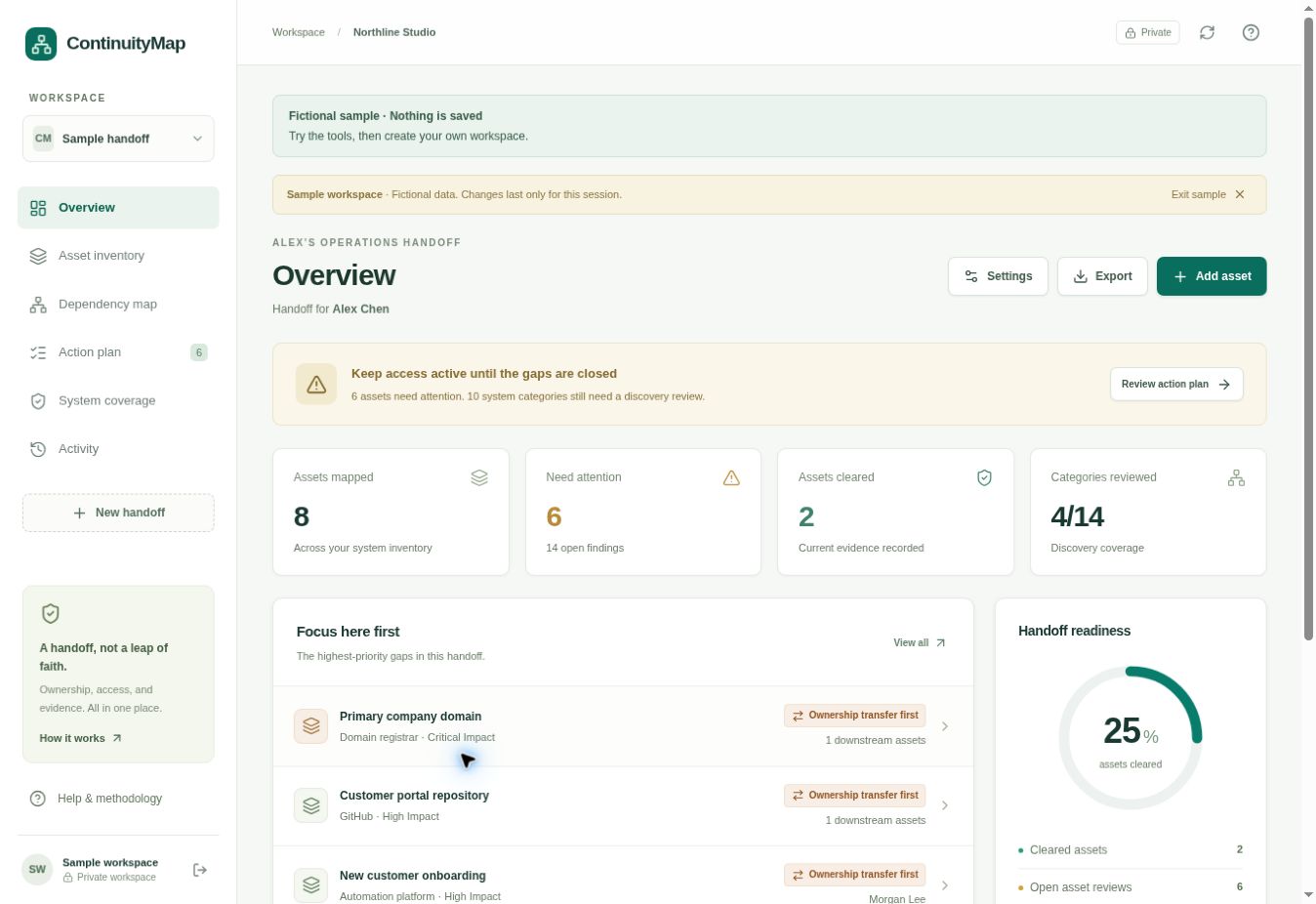
Handoff overview
- One handoff per departing employee or contractor, with their account aliases recorded
- Dashboard counters for assets mapped, assets that need attention, assets cleared and categories reviewed (e.g. 4/14)
- A Focus here first list of the highest-priority gaps and a handoff readiness ring showing the share of assets cleared
- An advisory banner such as "Keep access active until the gaps are closed", plus an activity log
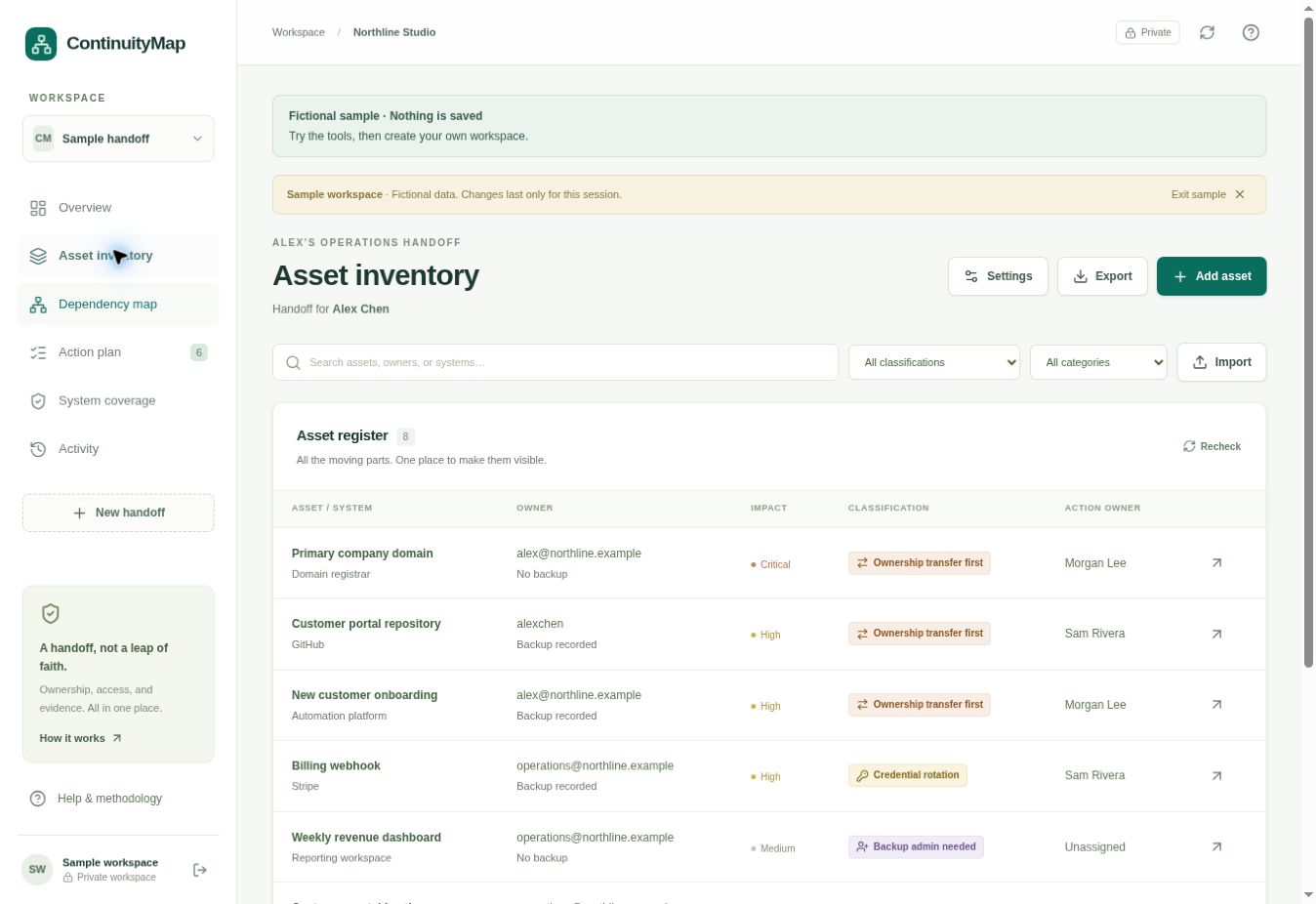
Asset inventory
- An asset register listing each system with its owner, backup status, business impact, classification and action owner
- Search plus filters by classification and category, and CSV import
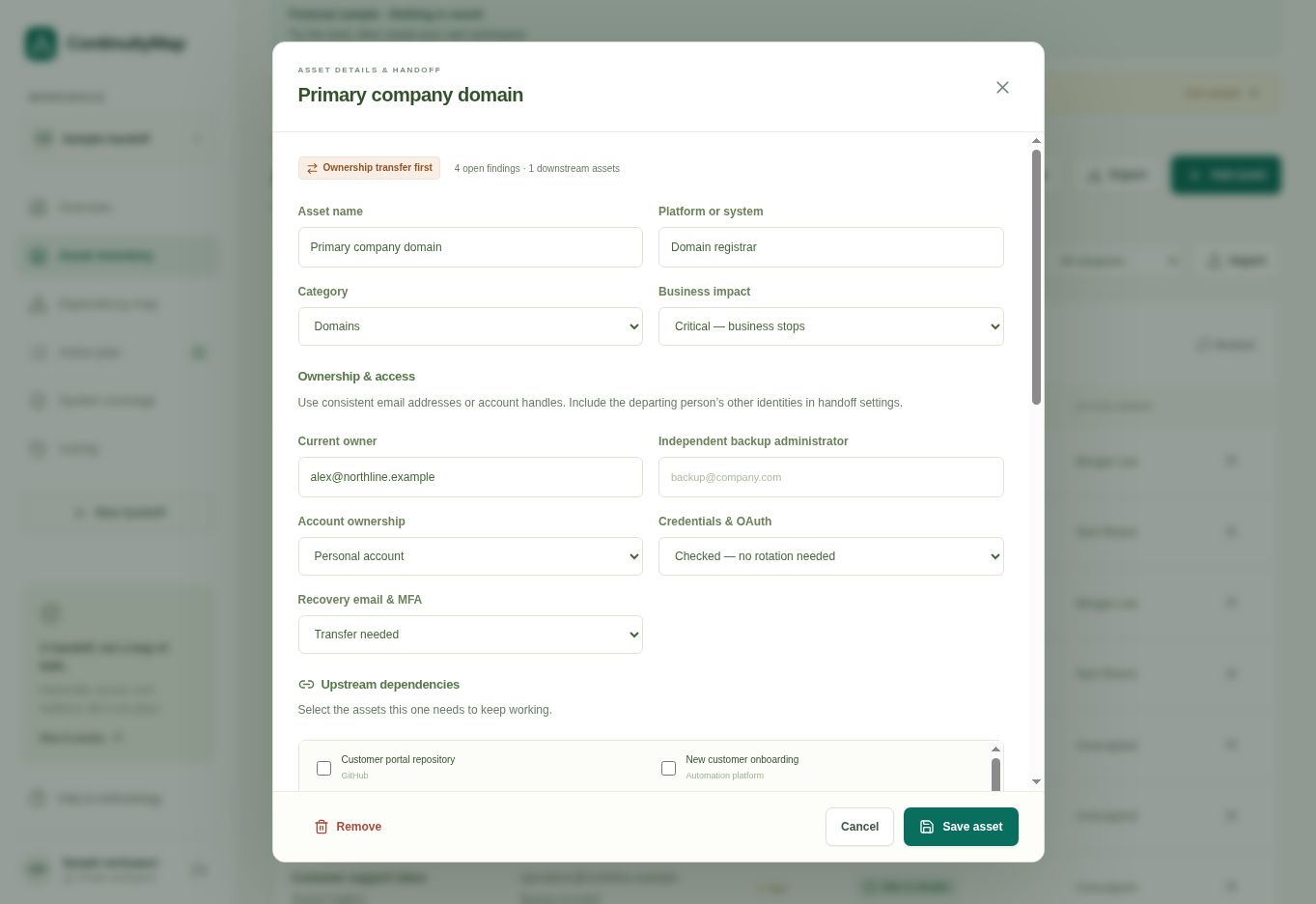
- Asset detail forms for platform, category, business impact (e.g. "Critical: business stops"), current owner, independent backup administrator, account ownership (personal or organization), credentials & OAuth and recovery email & MFA
- Upstream dependencies selected per asset
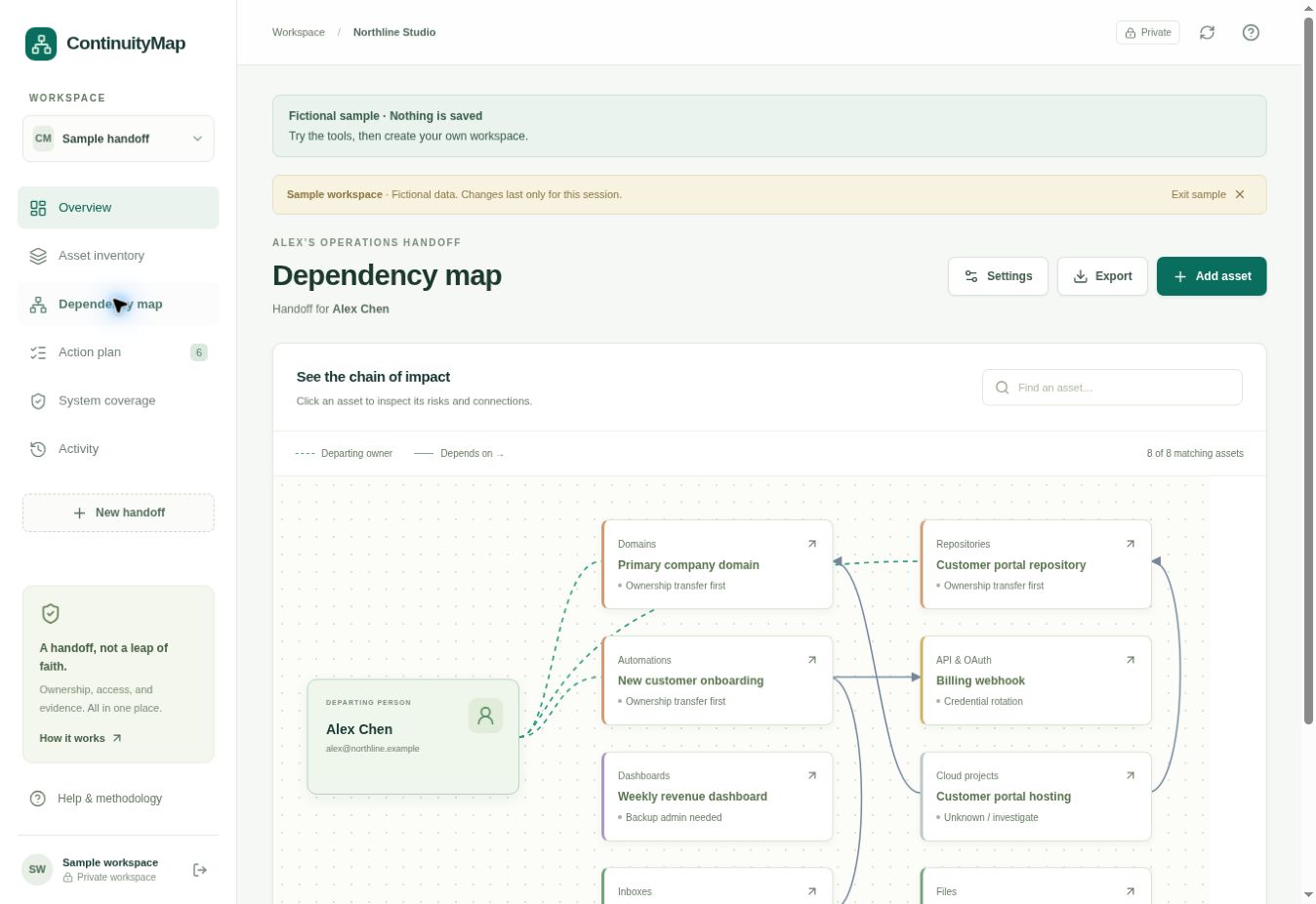
Dependency map and risk rules
- A visual chain of impact linking the departing person to the domains, repositories, automations, APIs, dashboards, cloud projects, inboxes and files they own
- Deterministic rules classify each asset, for example Ownership transfer first, Credential rotation, Backup admin needed or Unknown / investigate
- Click any asset to inspect its risks and connections; search the map by asset name
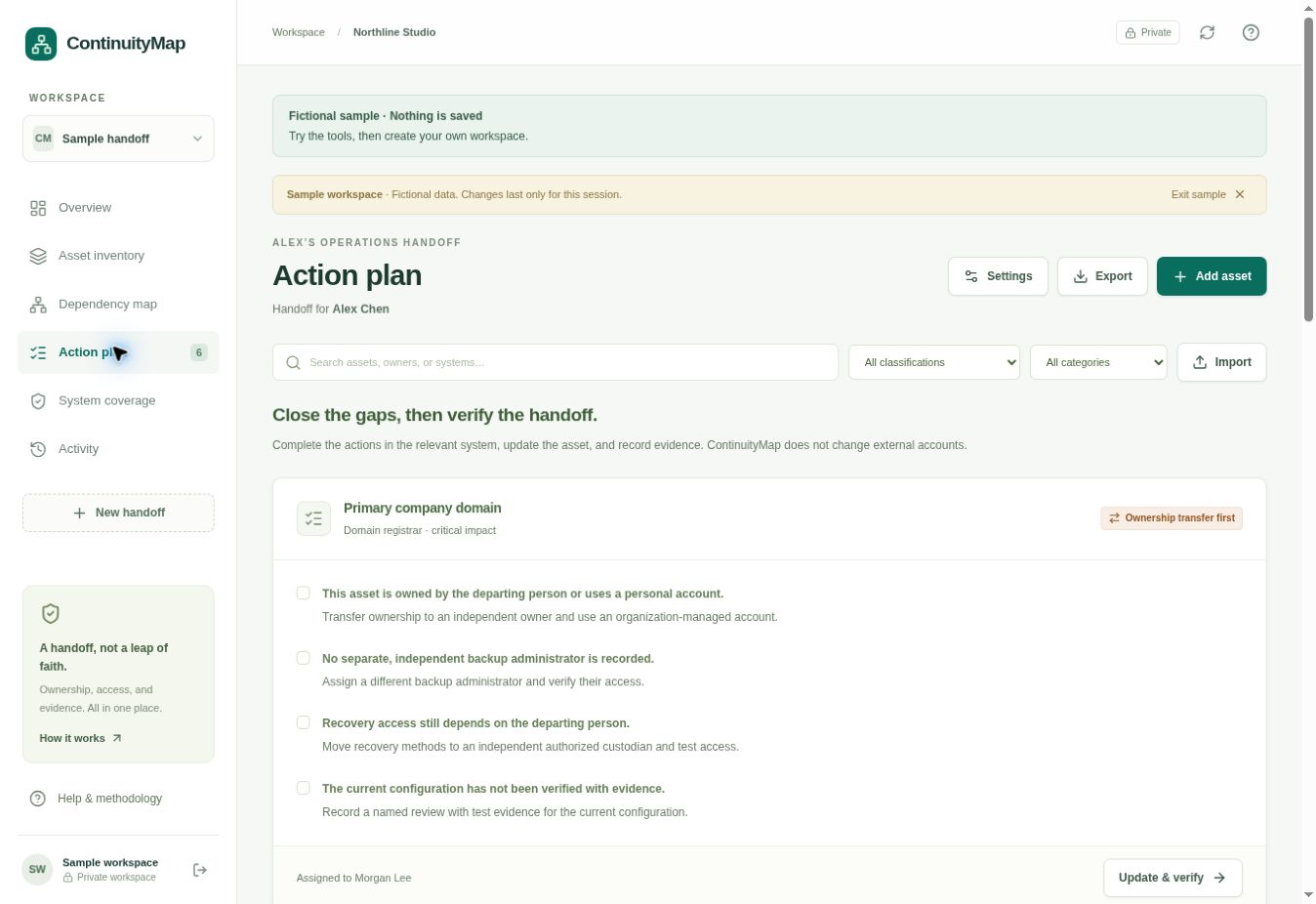
Action plan and evidence
- Per-asset checklists generated from the findings, such as transferring ownership to an organization-managed account, assigning a backup administrator, moving recovery methods and recording verification evidence
- Assignment of each item to an action owner, and an Update & verify step that records what was tested
System coverage checklist
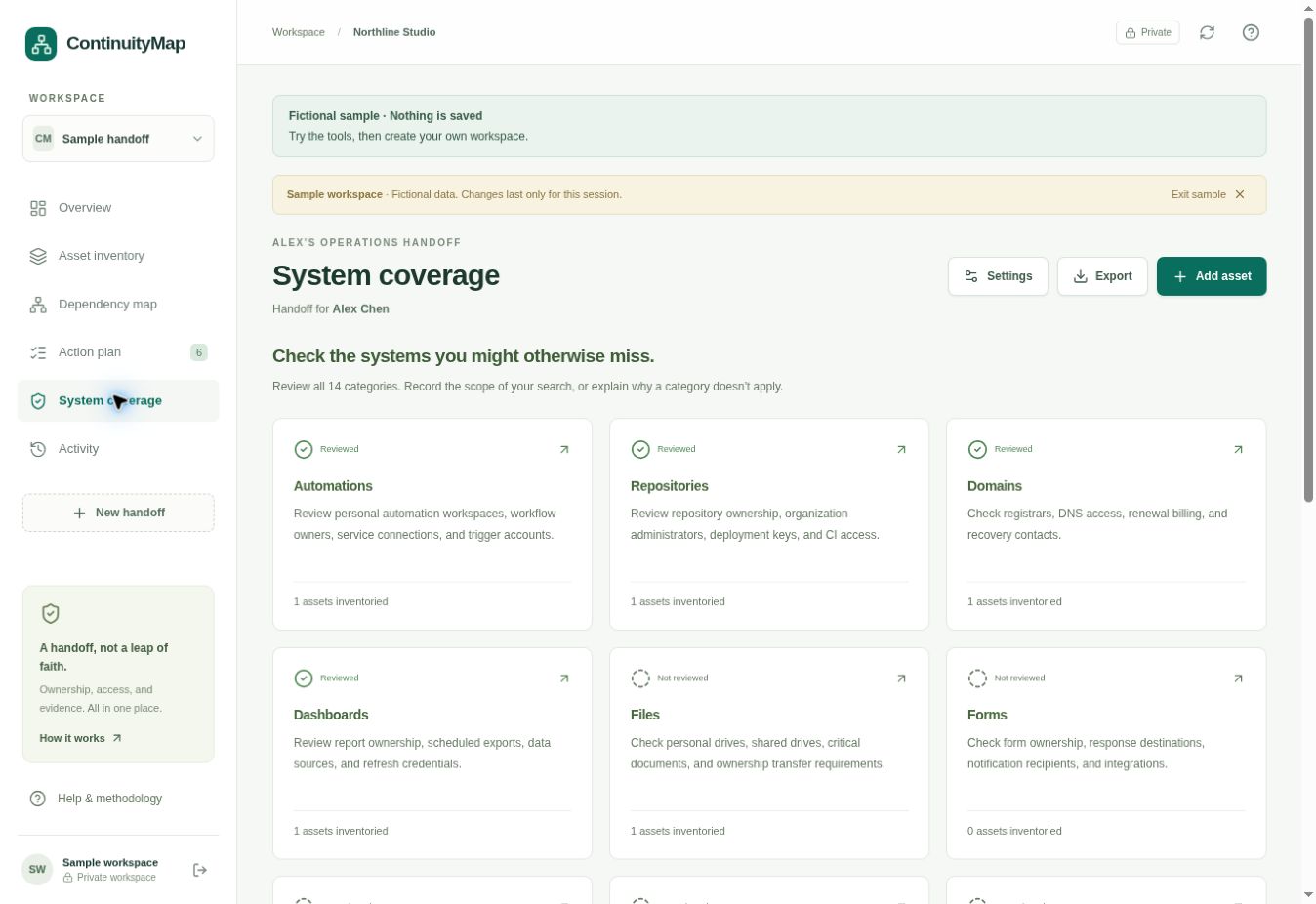
- Fourteen discovery categories (including automations, repositories, domains, dashboards, files and forms), each with guidance on what to check
- Each category is marked reviewed, with the search scope recorded or a reason why it does not apply
Reports, privacy and branding
- HTML handoff reports, CSV registers and JSON backups; the Android app also exports PDF reports
- Private, passphrase-protected workspaces encrypted in the browser; the Android edition uses Android Keystore encryption
- Configurable app name, logo, publisher and accent colour, with rebranding and build instructions
- Optional AI summary drafts using the customer's own compatible endpoint, model and API key
- A fictional sample workspace for demos
Who it is for
- IT consultants and managed service providers who handle client staff departures and want a repeatable, documented offboarding process
- Small businesses that want to reduce reliance on one person's knowledge of their systems
- Software founders who want to rebrand and sell an IT handoff or offboarding checklist product
How it works
- Create a private workspace protected by a passphrase.
- Start a handoff for the departing employee or contractor and record their account aliases.
- Add systems manually or import them from CSV, recording ownership, backup access, recovery, credentials, impact and upstream dependencies.
- Review the generated findings on the overview, dependency map and action plan.
- Make the required changes in the real systems, then record what was tested as evidence.
- Review all fourteen discovery categories and export the handoff report or a JSON backup.
Ways to monetize
A buyer could offer it as a branded tool inside an IT consulting or MSP offboarding service, sell it as a paid app under their own name, or charge per handoff report. Billing is not included, so any paid plan has to be added.
Technology
React · TypeScript · CSS (static web build, no database or hosted account service required) · Native Android in Java with the Android SDK and Android Keystore · Optional OpenAI-compatible Responses or Chat Completions API (customer's own key)
What you get
- Complete, exclusive ownership transfer to one buyer: application source, branding and project documentation
- The current web build and a signed Android APK
- Build configuration, tests and third-party licence notices
- Rebranding and build instructions
- 30 days of seller support
Good to know
- Early stage. The seller states there is no customer base, revenue or measured savings. Automated checks, web builds and APK signature verification passed; physical Android testing and a live customer-key AI request are still to be completed.
- Manual by design. There is no automatic system discovery, external account automation, shared-team collaboration, cloud sync or billing. ContinuityMap does not change external accounts; administrators make the changes in each system.
- No iOS app. It ships as a web app and a native Android app. All screenshots show the web edition.
- Security process. Readiness labels are advisory and must never delay required access revocation. The seller notes the current access-related wording is a known item for refinement.
- Backups. Local encrypted workspaces need user-managed backups. Moving between web and Android is done with JSON backups, which reset verification.
- AI is optional. AI drafting uses your own API key and endpoint, is paid by you and depends on provider compatibility and browser CORS. No shared key is included.
- No guarantees. No outage-prevention or compliance guarantee is made. Ongoing support beyond 30 days and future development are by separate agreement; confirm transfer scope and Android signing-key handover with the seller.
Demo
What's included
- Website
- Android
Documentation
Add systems manually or import the supplied CSV format. Record ownership, independent backup access, recovery and credential work, business impact, action owners and upstream dependencies. Review the generated findings, complete required changes in the real systems, and record what was tested. Review all fourteen discovery categories and export the handoff report or a JSON backup. Authorized administrators retain responsibility for access decisions; required security revocation must follow the organization's security process independently of continuity gaps.
The web app stores the workspace encrypted in the browser; the native Android edition uses Android Keystore encryption. Transfer between editions through JSON backups, which reset verification for review. There is no automatic sync. Optional AI drafting is configured with the customer's own compatible API and requires reviewing the proposed destination and data before sending.
Support
Included: 30 days
Contact the publisher
Reviews
No reviews yet.