Tenggo Learning Hub: Corporate Learning Management System (LMS) Source Code with Competency Tracking
Tenggo Learning Hub is a PHP and MySQL corporate LMS for employee training. Build sequenced learning paths, schedule and run live sessions with attendance, test with pre- and post-assessments, and track each employee's competency gaps and certifications on a management dashboard. Includes admin panel, website and a Flutter Android app.
Screenshots
About this product
Most companies still run employee training on spreadsheets, paper attendance sheets and certificates filed in folders. HR knows who was hired, but not who has finished safety induction, whose certification expires next month, or which drivers and technicians fall below the skill level their role requires. When an auditor or a client asks for proof of training, someone spends days pulling records together.
Tenggo Learning Hub is a corporate Learning Management System (LMS) built around that gap. It combines courses, sequenced learning paths, a training calendar, live sessions with attendance, assessments, competency standards per position, gap analysis and certification tracking, all reported on a "Learning Command Center" dashboard. The demo data is set up for a transport and logistics workforce (drivers, cargo handling, defensive driving), but the structure works for any organization that trains staff by role, department or site.
Features
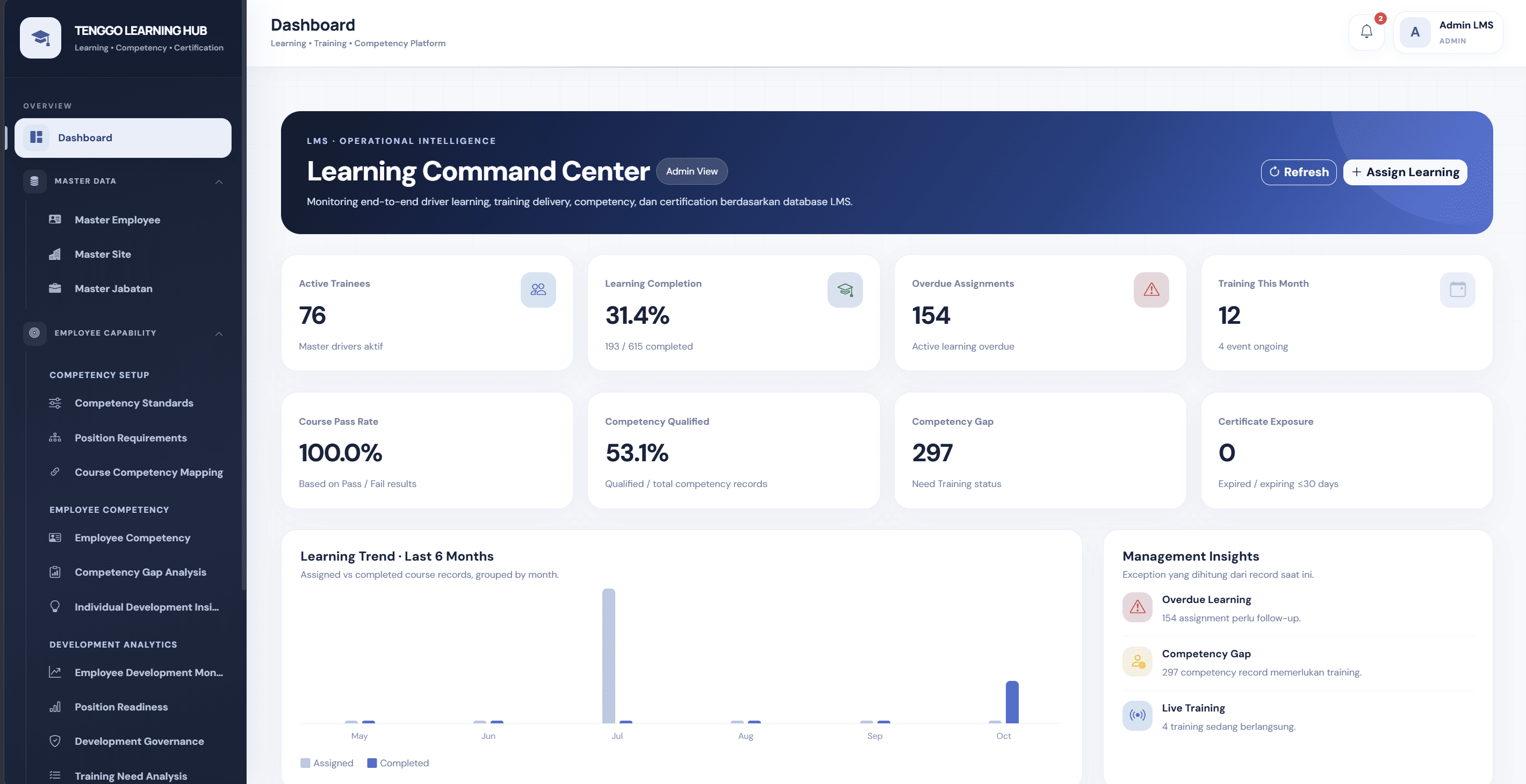
Learning Command Center dashboard
- KPI cards for active trainees, learning completion (completed vs assigned), overdue assignments and training this month
- Course pass rate, competency qualified %, competency gap count and certificate exposure (expired or expiring within 30 days)
- A learning trend chart of assigned vs completed course records over the last six months
Courses, materials and assessments
- Course management with course codes, delivery type (online, classroom, practical or blended), duration and a mandatory flag
- A learning materials library for modules, documents and training videos
- An Assessment Studio for pre-tests and post-tests, with pass marks (e.g. pass 80%)
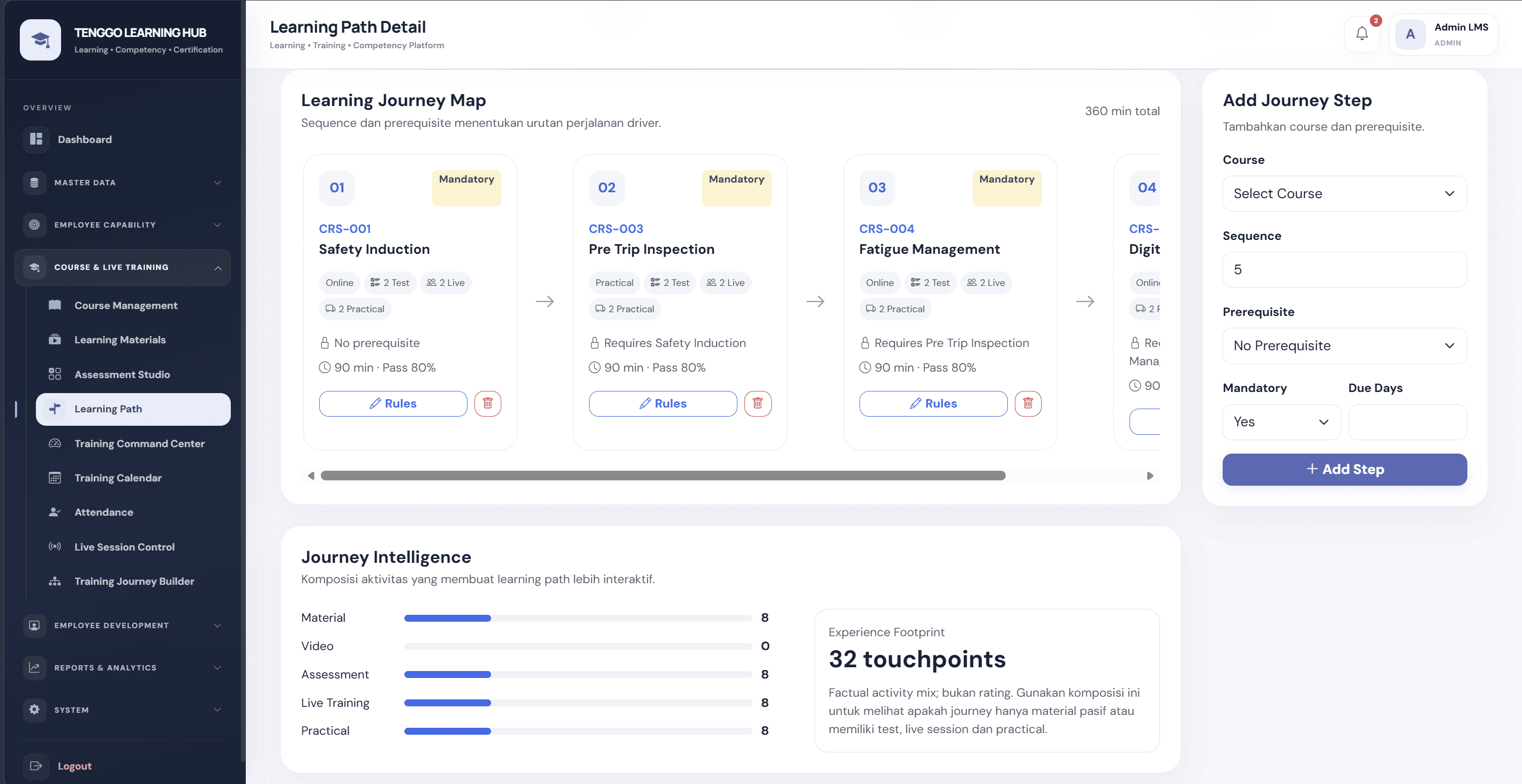
Learning paths and journey builder
- A visual Learning Journey Map: a sequence of courses, each showing its delivery mode, tests, live sessions, practicals, prerequisite, duration and pass mark
- Add Journey Step: choose a course, sequence number, prerequisite, mandatory yes/no and due days
- Journey Intelligence: the activity mix (material, video, assessment, live, practical) in each path
Training calendar and live sessions
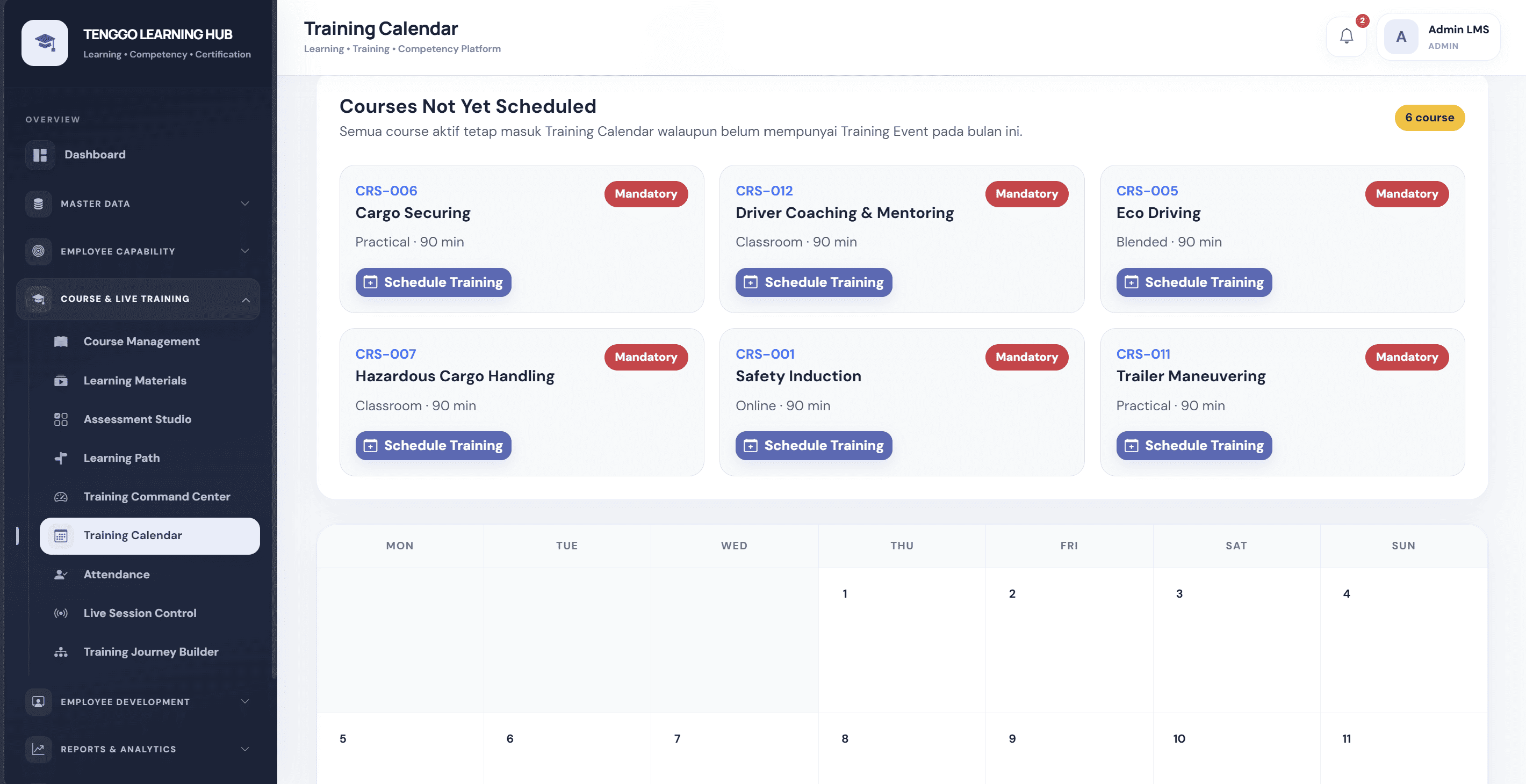
- A monthly training calendar plus a "courses not yet scheduled" list with a one-click Schedule Training button
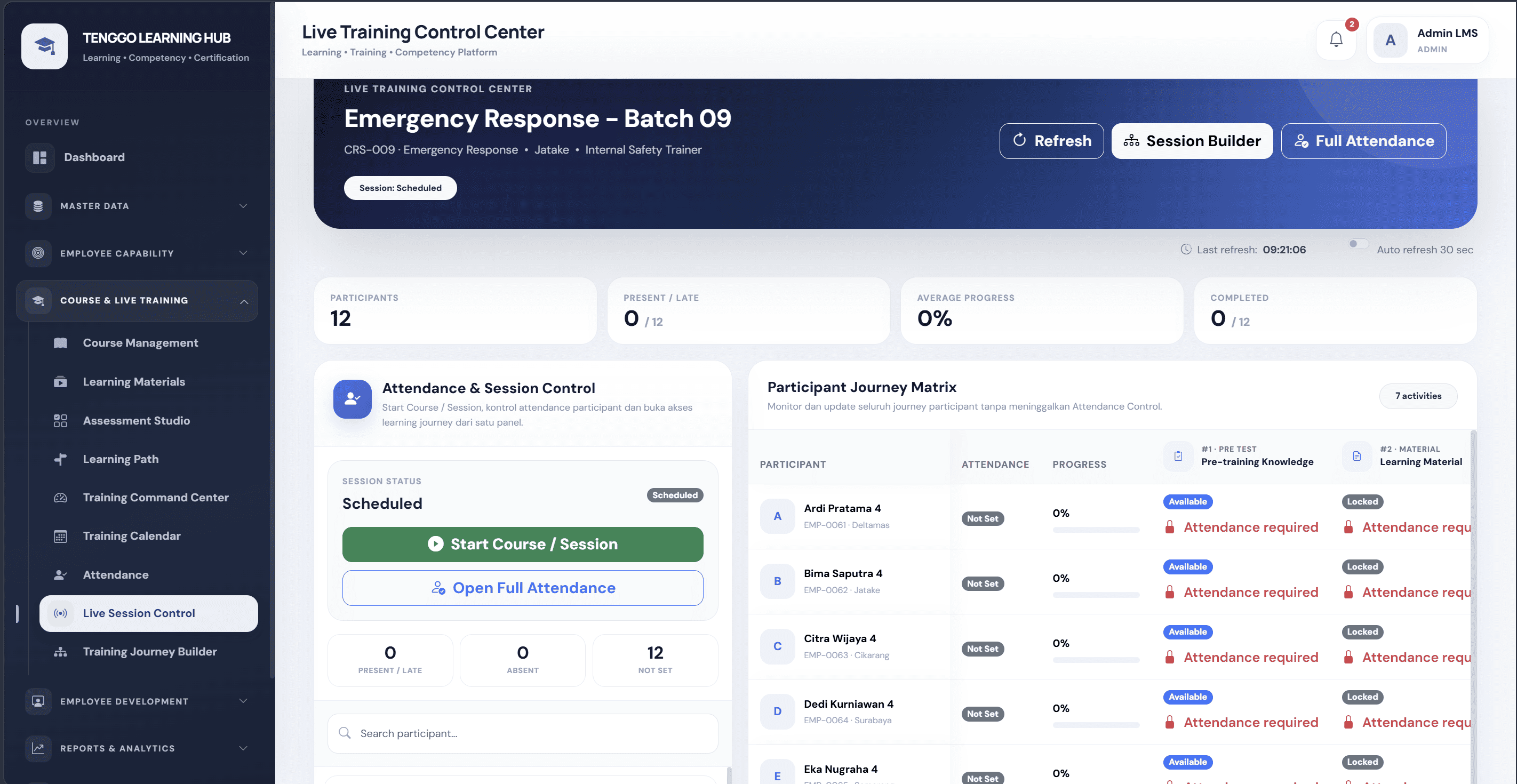
- A Live Training Control Center per batch: course, site, trainer and session status
- Start Course / Session, present/late, absent and not-set counts, and a full attendance screen
- A Participant Journey Matrix that shows each participant's attendance, progress and activity status (pre-test, material and so on), with activities locked until attendance is recorded
Competency management
- Competency standards, position requirements and course–competency mapping
- An Employee Competency register and competency gap analysis
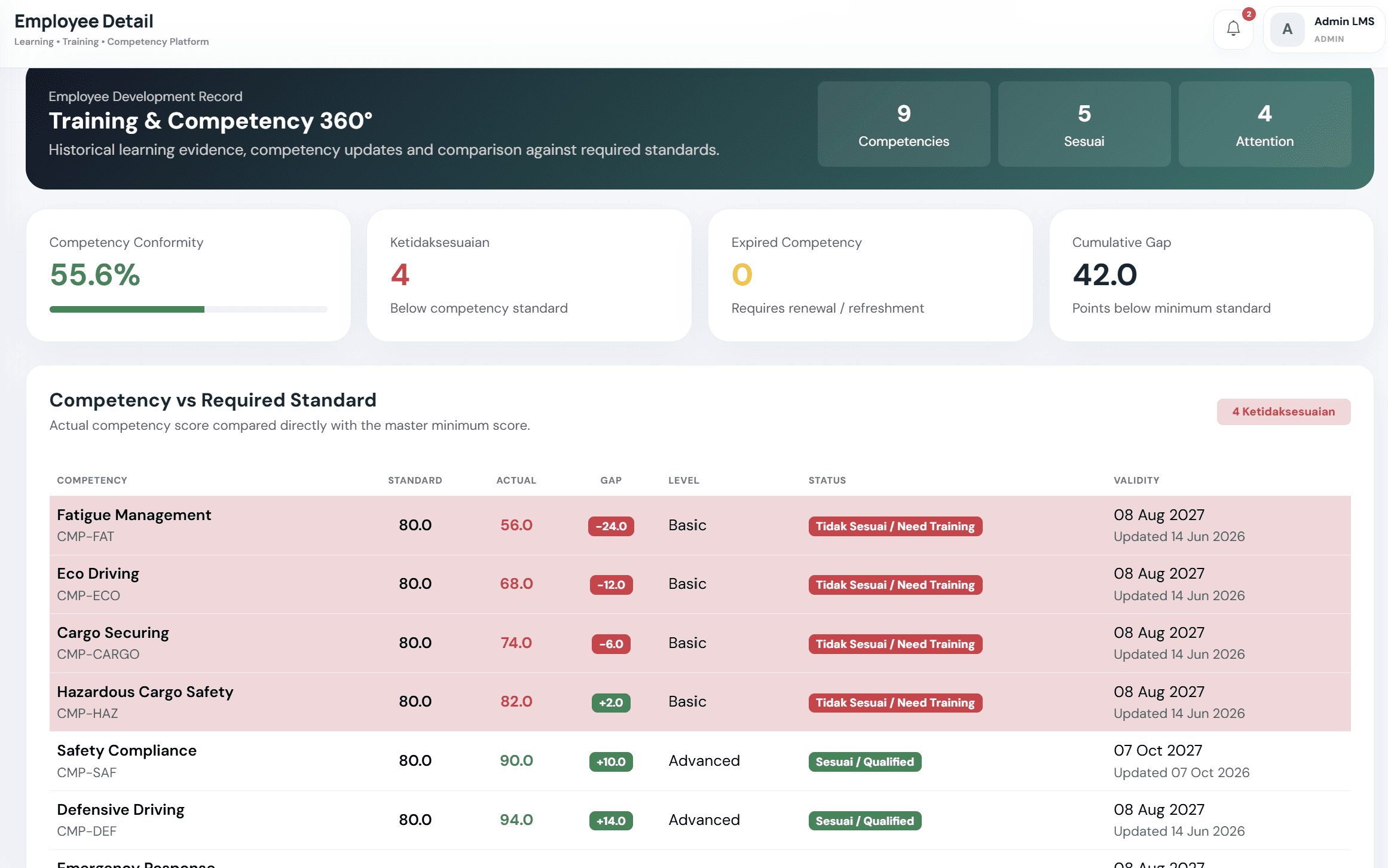
- A Training & Competency 360° employee record: each competency's required standard, actual score, gap, level (basic or advanced), status and validity date
- Position readiness, development monitoring and training need analysis
Administration and access
- Master data for employees, sites (locations) and positions
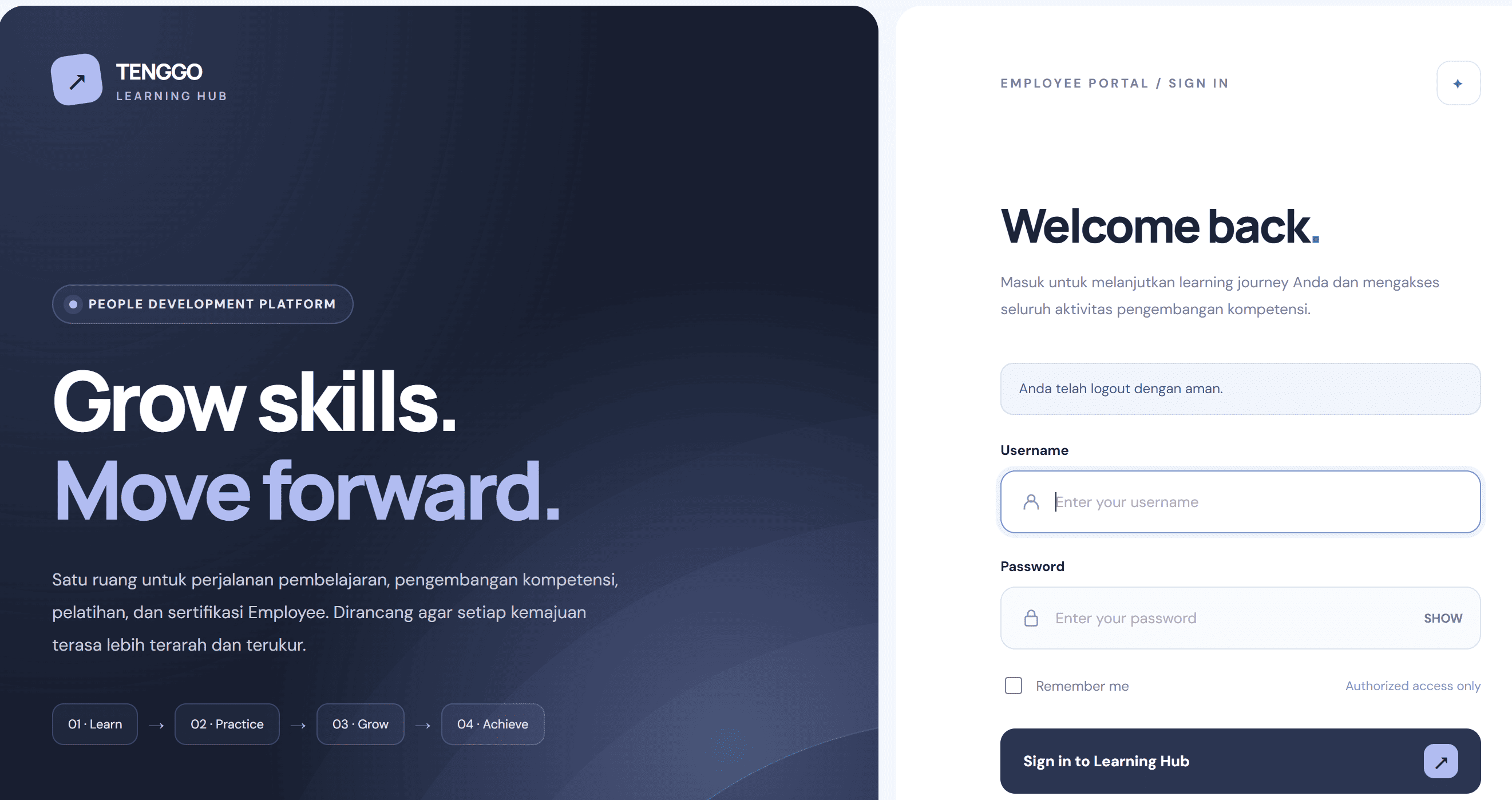
- An employee portal sign-in with "remember me"; the login screen lists Employee, Trainer, Training, Management and Administrator roles
Who it is for
- HR and Learning & Development teams that need onboarding, mandatory training and records in one place
- Logistics, transport and fleet operators training drivers, warehouse and operations staff (the demo data already covers this)
- Manufacturing and industrial companies running safety, equipment and quality training across sites
- Training providers and internal academies running blended programs
How it works
- The admin loads employees, sites and positions, then creates courses, materials, assessments and competency standards.
- Courses are sequenced into learning paths with prerequisites, mandatory flags and due days, then assigned to employees.
- Instructor-led sessions are scheduled on the training calendar; trainers run them from the live session control panel and record attendance.
- Employees sign in to the learning portal, complete materials and pre-/post-tests.
- Scores update each employee's competencies; gaps, expiring certifications and overdue training show up on the dashboard and reports.
Ways to monetize
A buyer could sell it as a hosted multi-company LMS on a per-employee subscription, license it on-premise to enterprises with setup and customization fees, or package it as an industry-specific product (e.g. driver training and compliance for fleets).
Technology
PHP 8 · MySQL 8 · HTML5 / CSS3 · JavaScript · Bootstrap 5 · Chart.js · Flutter (Android app)
What you get
- Admin panel source code (PHP 8, MySQL 8)
- Website / learner portal source code (PHP, Bootstrap 5, JavaScript, Chart.js)
- Android app source code (Flutter; APK / AAB build)
- 30 days of seller support
Dalam Bahasa Indonesia
Tenggo Learning Hub adalah sistem manajemen pembelajaran (LMS) korporat untuk pelatihan karyawan: manajemen course dan materi, learning path dengan prerequisite, kalender training, kontrol sesi live dan absensi, pre-test dan post-test, standar kompetensi per jabatan, analisis gap kompetensi, serta sertifikasi. Dibangun dengan PHP dan MySQL, dengan aplikasi Android berbasis Flutter. Sebagian antarmuka saat ini berbahasa Indonesia.
Good to know
- Language. The interface is a mix of English and Bahasa Indonesia (e.g. "Master Jabatan", "Sesuai / Tidak Sesuai", several helper texts). Plan a translation pass for other markets; ask whether strings are in language files or hard-coded.
- Branding. The login footer shows a company copyright (PT. Graha Prima Sukses Mandiri). Confirm with the seller that they own the code and can transfer full rights, and that it can be rebranded.
- Screenshots cover the admin panel only. The learner website and the Flutter Android app are listed as deliverables but not shown; ask for screens or a demo. There is no iOS app listed.
- Demo logic check. In one competency screenshot a score above the standard is still marked "need training"; confirm with the seller how competency status is calculated.
- Scope. No live demo, video, customers or revenue are stated, and there is no payment module for selling courses: this is an internal training system, not a course marketplace.
- Maintenance. A $1,000 maintenance price is listed without a stated period or scope; agree terms with the seller.
What's included
- Admin Panel
- Website
- Android
Documentation
Our Learning Management System (LMS) provides a centralized, step-by-step platform for managing employee training, learning activities, competency development, and certification.
Step 1: Set Up Employees & Learning Profiles
Administrators register employees or learners, organize them by department, location, or job role, and manage individual learning profiles.
Step 2: Create Courses & Training Materials
Build structured courses with learning modules, videos, training documents, and assessments. Organize materials into a logical sequence to create an engaging learning experience.
Step 3: Design & Assign Learning Paths
Create personalized learning journeys based on employee roles, onboarding programs, training requirements, or competency gaps. Assign courses to individual employees or multiple learners simultaneously.
Step 4: Deliver Training & Learning Activities
Employees log in to their learning portal to access assigned courses, complete learning modules, watch training videos, and participate in scheduled instructor-led training sessions.
Step 5: Conduct Assessments & Evaluations
Measure employee knowledge through pre-tests and post-tests. Track assessment results, evaluate learning outcomes, and identify areas requiring additional development.
Step 6: Monitor Learning Progress
Administrators use centralized dashboards to monitor training participation, course completion, learning progress, attendance, and assessment performance.
Step 7: Track Competencies & Certifications
Connect completed courses to competency requirements, monitor employee skill development, and manage certification records to support workforce readiness and compliance.
Step 8: Generate Reports & Analyze Performance
Access training reports, learning histories, competency records, assessment results, and certification information to evaluate training effectiveness and support management decisions.
Simple Workflow
Admin Creates Courses → Builds Learning Paths → Assigns Employees → Employees Complete Training → Assessments Measure Knowledge → Competencies Are Tracked → Certifications Are Managed → Management Reviews Reports
Built for Flexible Corporate Learning
The LMS supports self-paced online learning, structured onboarding, and scheduled training programs within one platform.
Developed with PHP and MySQL, the system features a responsive web interface, modular architecture, and customizable workflows to meet different organizational training needs.
From employee onboarding to continuous professional development, everything is managed in one integrated learning environment.
Support
Included: 30 days
Contact the publisher
Reviews
No reviews yet.