Calervia: ERP & CRM Desktop Software Source Code (Tauri + Supabase)
Calervia is a modular ERP and CRM desktop app for small and mid-sized businesses. A sales workspace runs quotations, sales orders and invoices; versioned price books handle customer and supplier pricing with quantity tiers; CSV/XLSX imports are validated before commit. Built with Tauri, TypeScript and Supabase, sold with full source code and IP.
Screenshots
About this product
Most small and mid-sized businesses run on a patchwork of tools: one app for quotes and invoices, a spreadsheet for prices, another system for stock, a CRM that nobody keeps up to date. Every handover between them means re-typing customer details and hoping the numbers match. The established ERP suites fix that, but they are expensive, complicated to roll out and locked behind per-seat subscriptions.
Calervia is a modular ERP and CRM desktop application built with Tauri, TypeScript and Supabase. It brings sales, customer records, pricing, stock, purchasing and accounts into one workspace, so a customer created once can flow into quotations, sales orders and invoices. The seller is offering the full source code and IP, which makes it a ready foundation for an agency, ERP consultant or SaaS founder who wants to rebrand and sell their own business management software.
Features
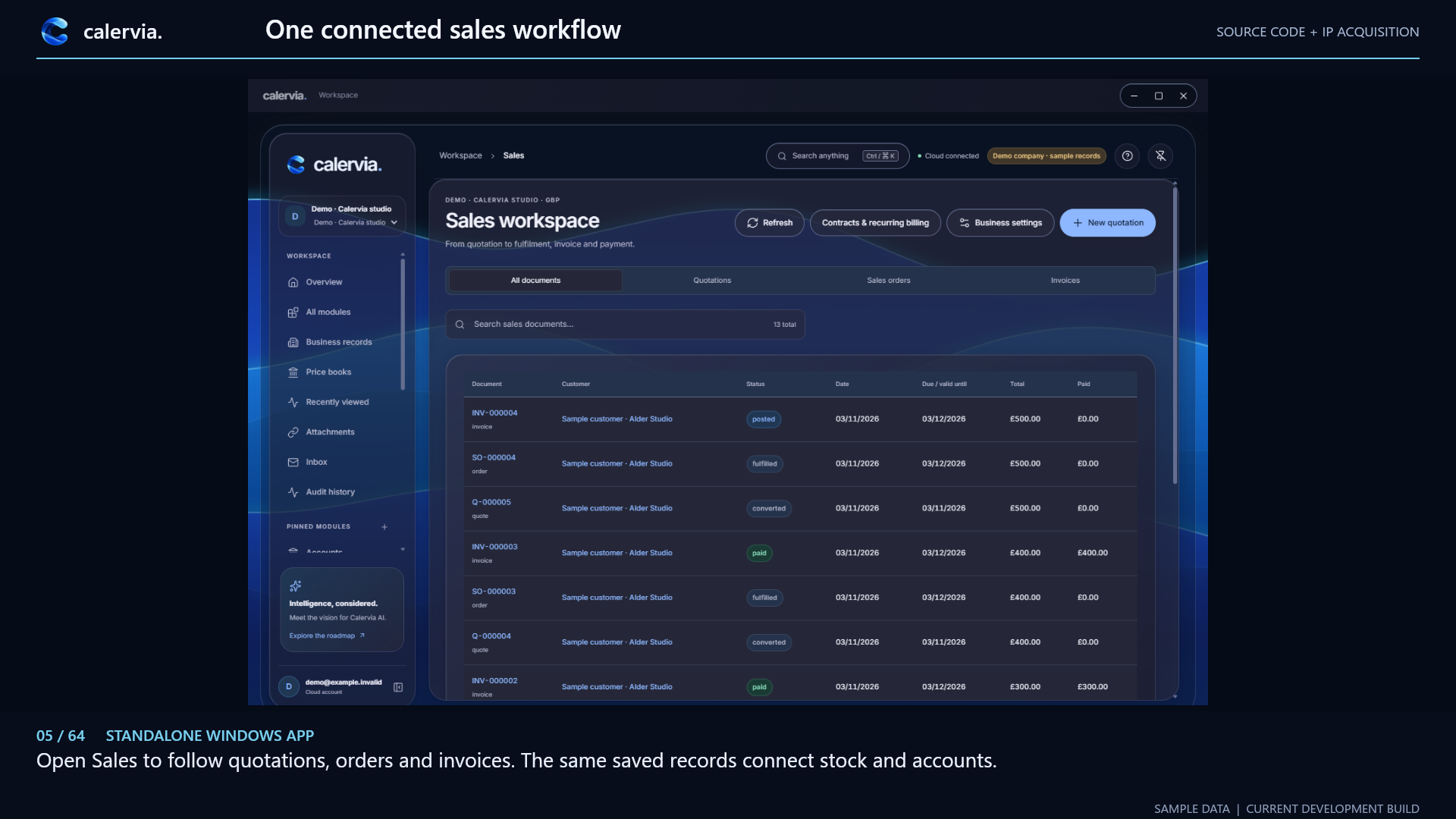
Sales workspace: quote to cash
- One Sales workspace that follows a deal "from quotation to fulfilment, invoice and payment"
- Tabs for All documents, Quotations, Sales orders and Invoices, with numbered documents (Q-, SO-, INV-)
- Document statuses shown in the build include converted, fulfilled, posted and paid, with date, due/valid-until date, total and amount paid
- A New quotation action and a Contracts & recurring billing area
- Searchable sales document list
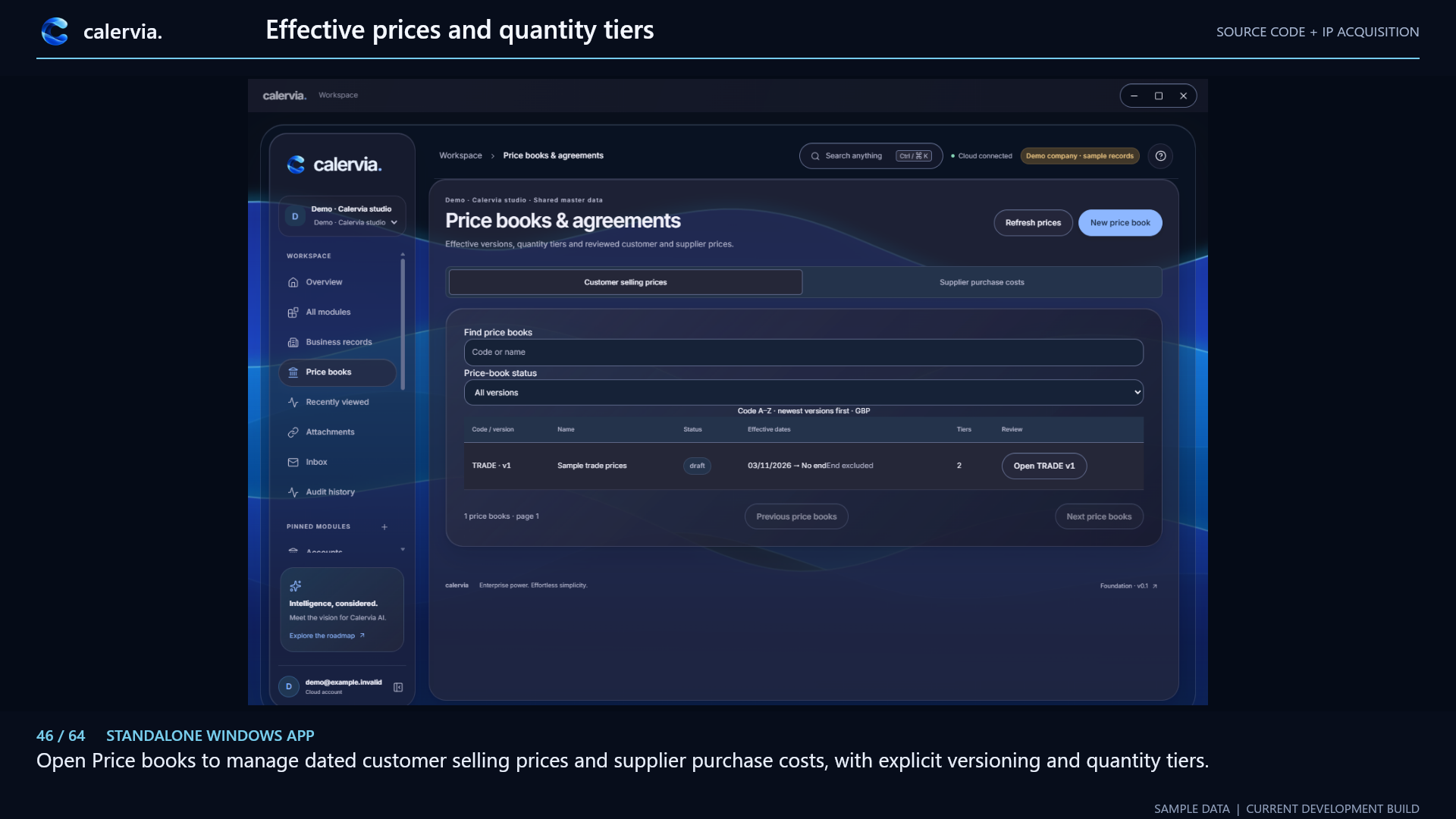
Price books and agreements
- Separate customer selling prices and supplier purchase costs
- Versioned price books with effective dates (start and optional end) and a draft/review status
- Quantity price tiers per price book
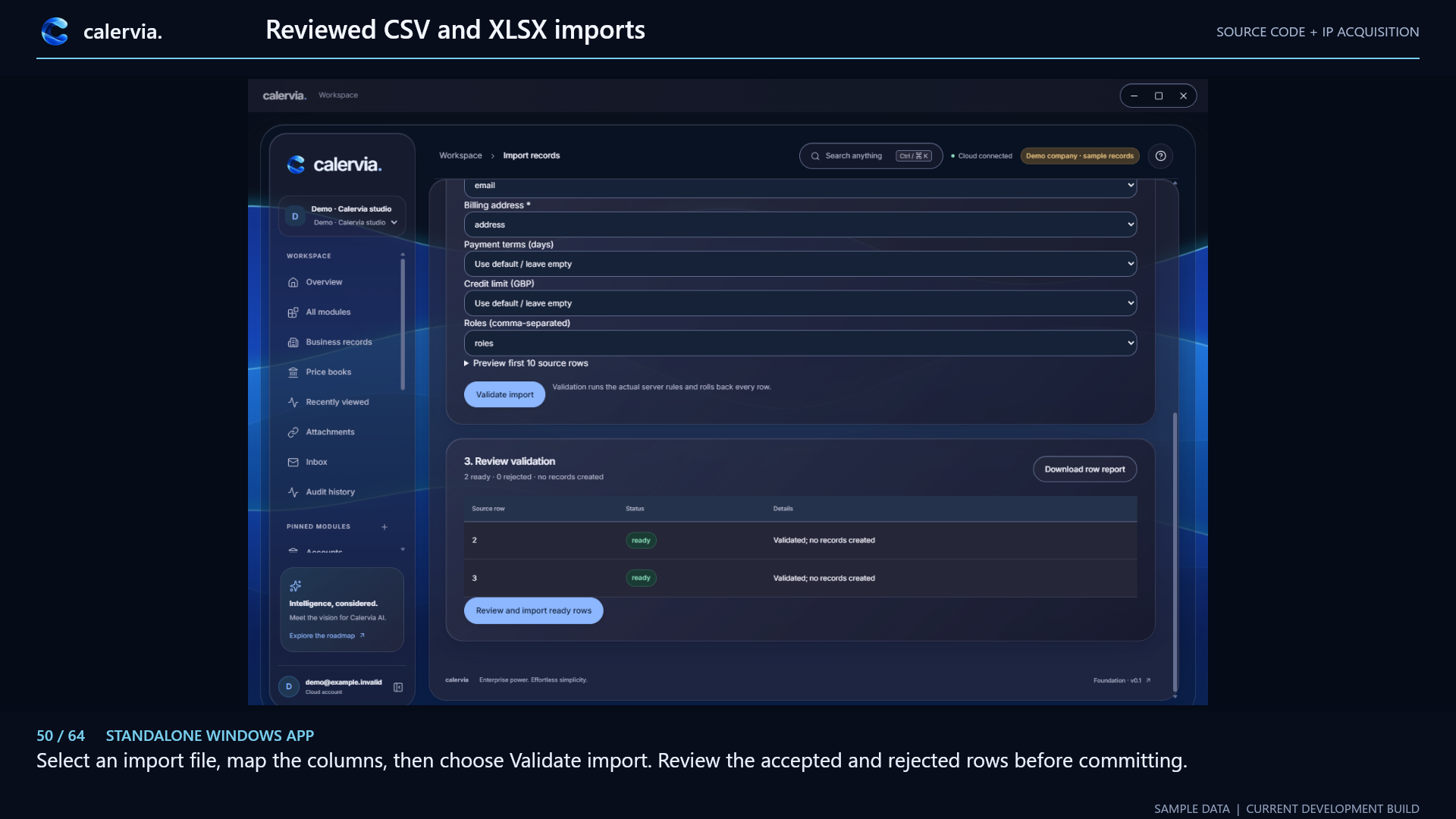
Reviewed CSV and XLSX imports
- Import records from CSV or XLSX and map source columns to fields such as email, billing address, payment terms, credit limit and roles
- Preview the first 10 source rows before importing
- Validate import runs the real server rules and rolls back every row, so nothing is written until you approve
- A review table of ready and rejected rows, a downloadable row report, then Review and import ready rows
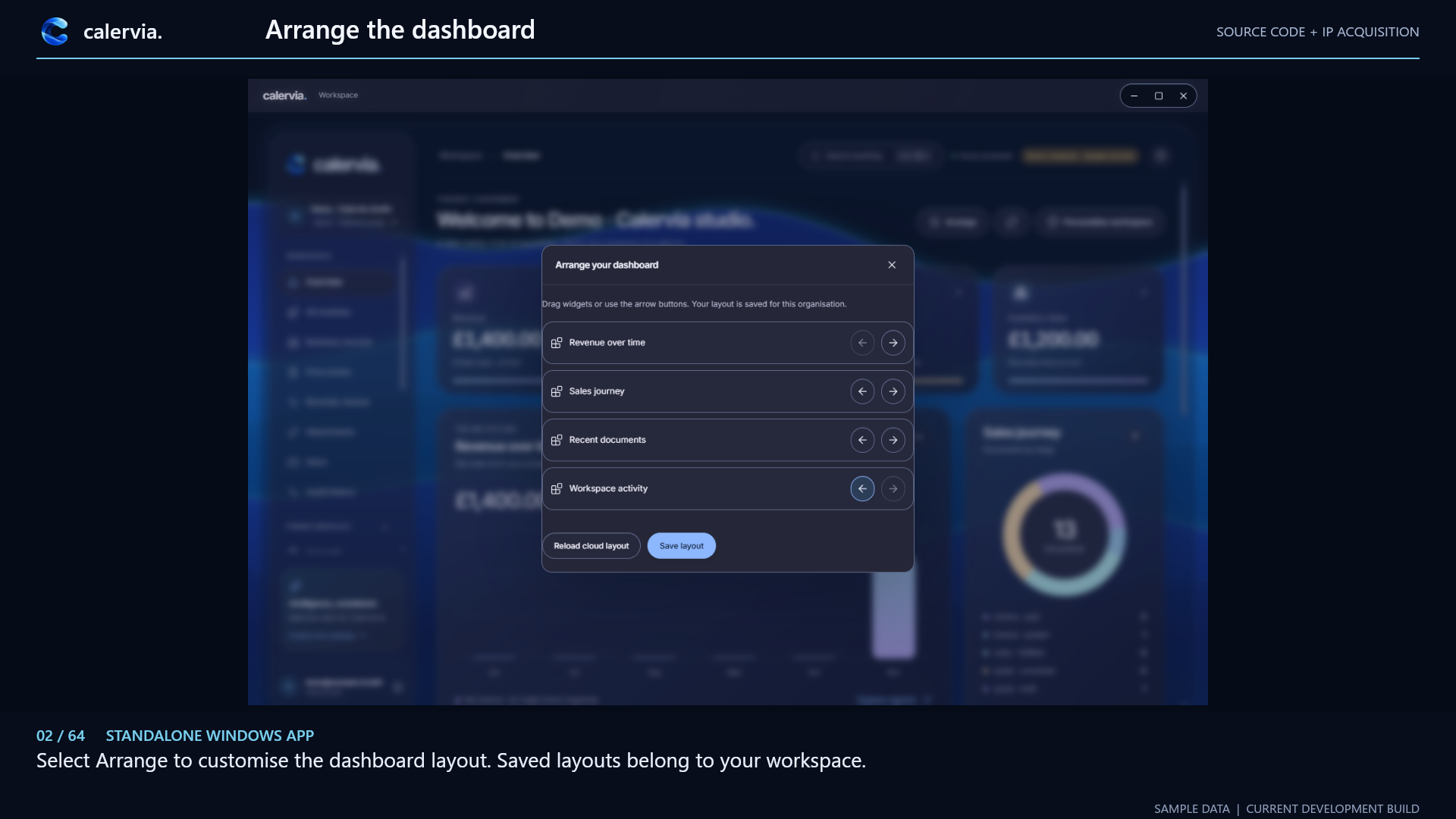
Customisable dashboard
- Widgets for revenue over time, sales journey, recent documents and workspace activity
- An Arrange mode to reorder widgets; the layout is saved per organisation in the cloud
Workspace and administration
- Multi-organisation workspace switcher and a "cloud connected" status indicator
- Global Search anything (Ctrl/Cmd + K)
- Navigation for Overview, All modules, Business records, Price books, Recently viewed, Attachments, Inbox and Audit history, plus pinned modules
- Business settings and role-based permissions for staff access (per the seller)
Modules described by the seller
Beyond what the four screenshots show, the seller describes modules for financial management and accounting, CRM, inventory tracking, purchasing, manufacturing, project management, human resources and reporting, and says most major modules are functional.
Who it is for
- Software agencies and ERP consultants who want a white-label ERP to customise and resell to clients
- SaaS entrepreneurs looking for an existing ERP/CRM codebase instead of building from zero
- SMEs (retail, wholesale, manufacturing, services) that want to own their business software rather than rent it
How it works
- Install the desktop app and connect it to your own Supabase project (database, authentication and storage).
- Set up the organisation, business settings, users and role-based permissions.
- Import existing customers and records from CSV or XLSX through the validated import flow.
- Create price books, then raise quotations, convert them to sales orders and invoices, and record payments.
- Track revenue, the sales journey and workspace activity from the dashboard and audit history.
Ways to monetize
A buyer could sell Calervia as a per-seat or per-organisation subscription, offer it as a one-time licence with paid hosting on a managed Supabase instance, charge for implementation and data migration, or build industry editions (retail, wholesale, manufacturing) on the same core.
Technology
Tauri (desktop shell, Rust) · TypeScript · Supabase (PostgreSQL, Auth, Storage) · SQL · CSS
What you get
- Full Calervia desktop application source code and IP
- Supabase backend structure (database, authentication and storage setup)
- 30 days of seller support
Good to know
- Pre-revenue, development build. The seller states Calervia has no established customer base yet. The screenshots are labelled "current development build", show sample data and a "Foundation v0.1" version tag.
- Module coverage. Only sales, price books, imports and the dashboard are shown in screenshots. Ask the seller to demo the accounting, inventory, purchasing, manufacturing, HR and project modules before buying.
- Platforms. The screenshots are captioned "standalone Windows app". Tauri can target macOS and Linux, but confirm with the seller whether those builds have been tested.
- AI. The sidebar links to a roadmap for "Calervia AI"; this is a vision, not a shipped feature.
- Your accounts. You need your own Supabase project, and code-signing certificates if you distribute the installer.
- Localisation. The demo runs in GBP. Confirm multi-currency and tax/VAT handling for your market.
What's included
- Desktop
Documentation
Calervia operates as a modular desktop-based Enterprise Resource Planning (ERP) platform, combining multiple business management functions into one centralised application.
Built using Tauri, Calervia delivers a lightweight, responsive desktop experience, while Supabase provides the backend infrastructure for database management, authentication, data storage, and secure business operations.
When first launching Calervia, users configure their organisation, connect their Supabase infrastructure, and establish their preferred settings, permissions, and business requirements. The platform’s modular architecture allows different business functions to operate independently while sharing relevant information across the system.
For example, creating a customer within the CRM module allows their information to be used throughout invoicing, sales, project management, and other connected workflows. Similarly, inventory, purchasing, and financial records can work together to reduce repetitive data entry and improve operational efficiency.
Administrators can manage employee access through role-based permissions, customise the interface, configure operational workflows, and monitor business activity through reporting and analytics tools.
Calervia is designed to give businesses greater control over their software and infrastructure, reducing reliance on expensive subscription-based ERP services while providing a flexible foundation for future expansion and customisation.
Support
Included: 30 days
Contact the publisher
Reviews
No reviews yet.