Bare Health: Telehealth & Practice Management Platform with Provider, Pharmacy, Lab and Patient Portals
Bare Health is a multi-tenant telehealth platform for provider-guided wellness care. Practice owners, providers, pharmacies, labs and patients each get a workspace for intake, provider review, prescriptions, fulfillment, lab requisitions, tasks, flags and messaging. Built with React, TypeScript and Supabase; offered pre-launch.
Screenshots
About this product
Provider-guided wellness care (weight care, hormone panels, men's health, dermatology) rarely happens inside one business. A practice takes the intake, a licensed provider reviews it, a pharmacy fills the prescription, a lab draws and reports samples, and the patient waits in between. Most of those handoffs still run on phone calls, faxes, spreadsheets and separate portals, so tasks slip, prescriptions sit on hold and patients cannot see where their order is.
Bare Health is a multi-tenant telehealth and practice management platform that puts every party in the same system. Practice owners, providers, pharmacy teams, laboratory teams and patients each get their own workspace, built around the records, queues and actions that role needs. A case moves from intake and consent to provider review, pharmacy fulfillment or lab work, with tasks, flags and messages attached along the way. It is offered at the pre-launch stage as a foundation for a branded care platform, a white-label service or a multi-practice software business.
Features
Practice owner workspace
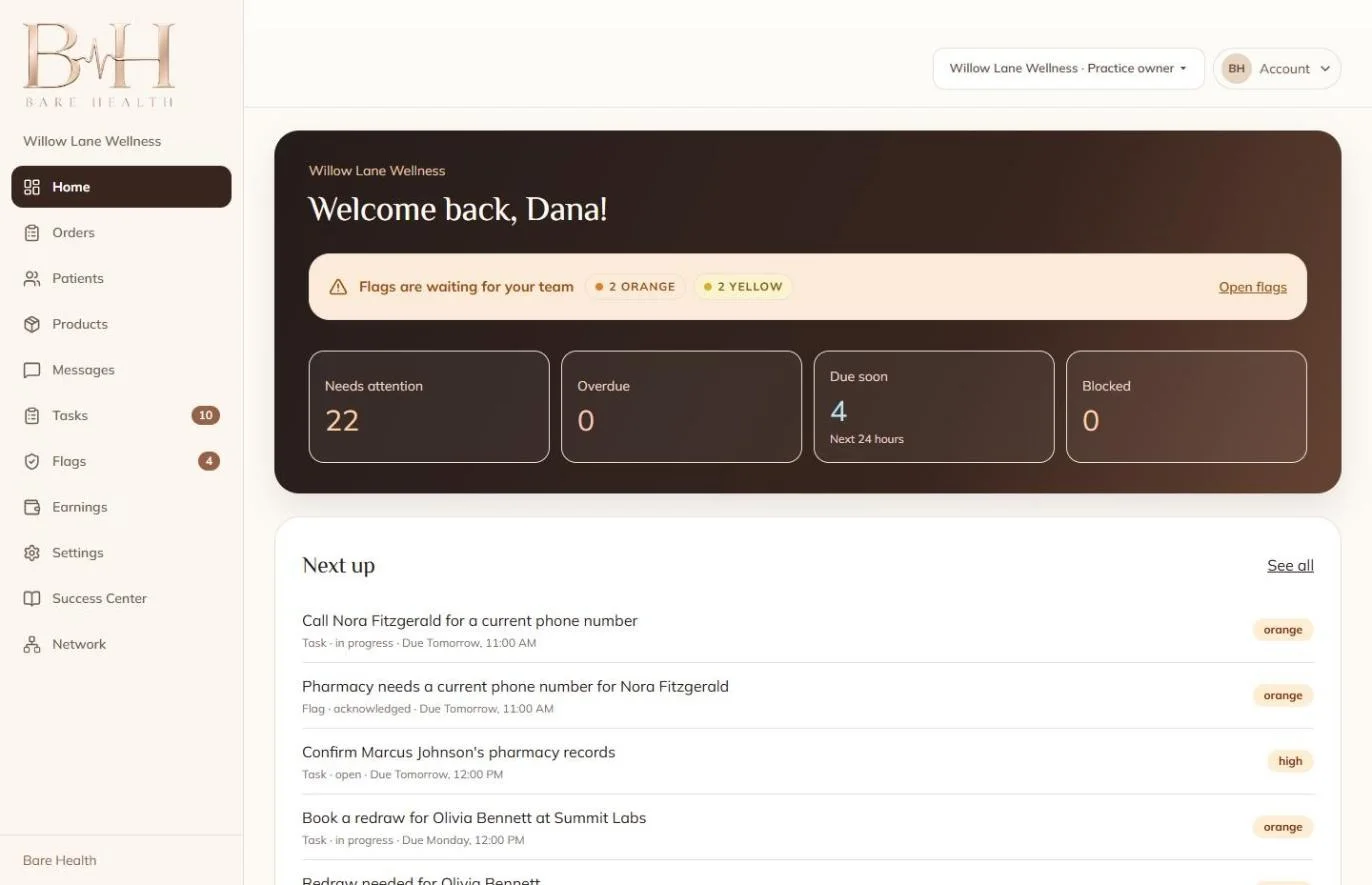
- A home dashboard with Needs attention, Overdue, Due soon (next 24 hours) and Blocked counters
- Colour-coded flags (orange and yellow) waiting for the team, with an Open flags shortcut
- A Next up list mixing tasks and flags, each with status, due time and priority
- Navigation for Orders, Patients, Products, Messages, Tasks, Flags, Earnings and Settings
- A practice switcher for owners who belong to more than one practice
Provider review queue
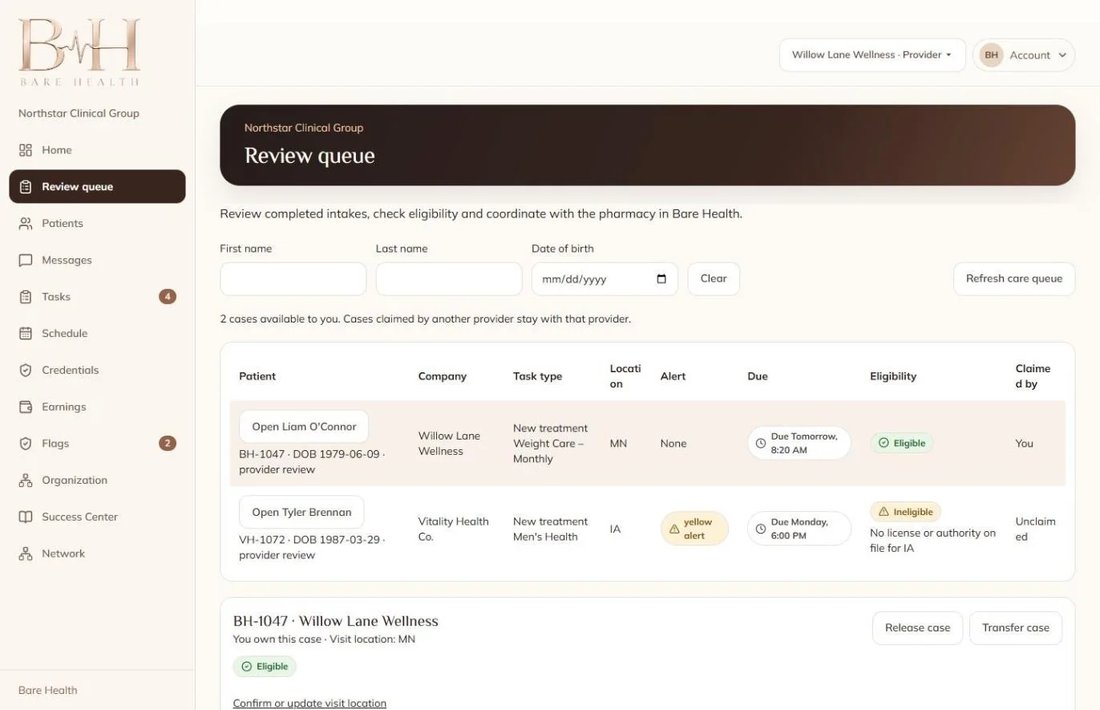
- A review queue of completed intakes, searchable by first name, last name and date of birth
- Each case shows company, task type (e.g. new treatment), patient location, alerts, due time and claim status
- Eligibility checks: a case is marked Ineligible when the provider has no licence or authority on file for the patient's state
- Case claiming: cases claimed by one provider stay with that provider, with Release case and Transfer case actions
- Provider menus for Schedule, Credentials, Organization, Tasks and Flags
- Per the seller, providers can request more information, arrange a visit or record a clinical decision
Pharmacy work queue
- A To verify, fill and ship queue with On hold, Ready to ship and Shipped views
- Prescription cards showing the medication, directions, quantity, days' supply and refills, alongside patient allergies and prescriber details
- Question to prescriber threads: the pharmacist puts a prescription on hold with a question and the provider's answer is recorded on the card
- Formulary management, print, tasks and flags
Laboratory workspace
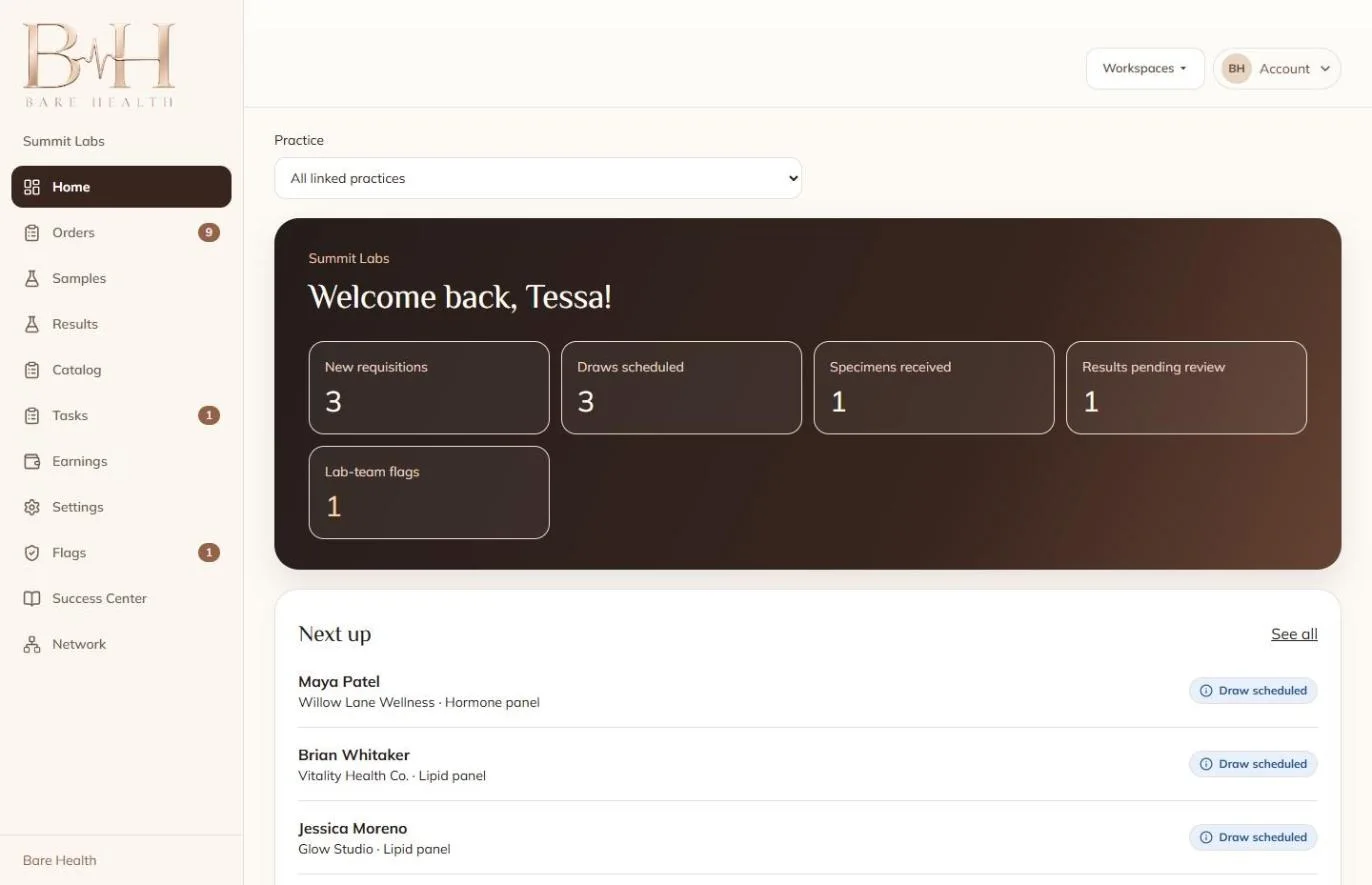
- A lab dashboard with New requisitions, Draws scheduled, Specimens received, Results pending review and lab-team flags
- Samples, Results and Catalog sections, filterable across all linked practices
- A Next up list of patients with their practice, panel type (e.g. lipid or hormone panel) and draw status
Patient portal
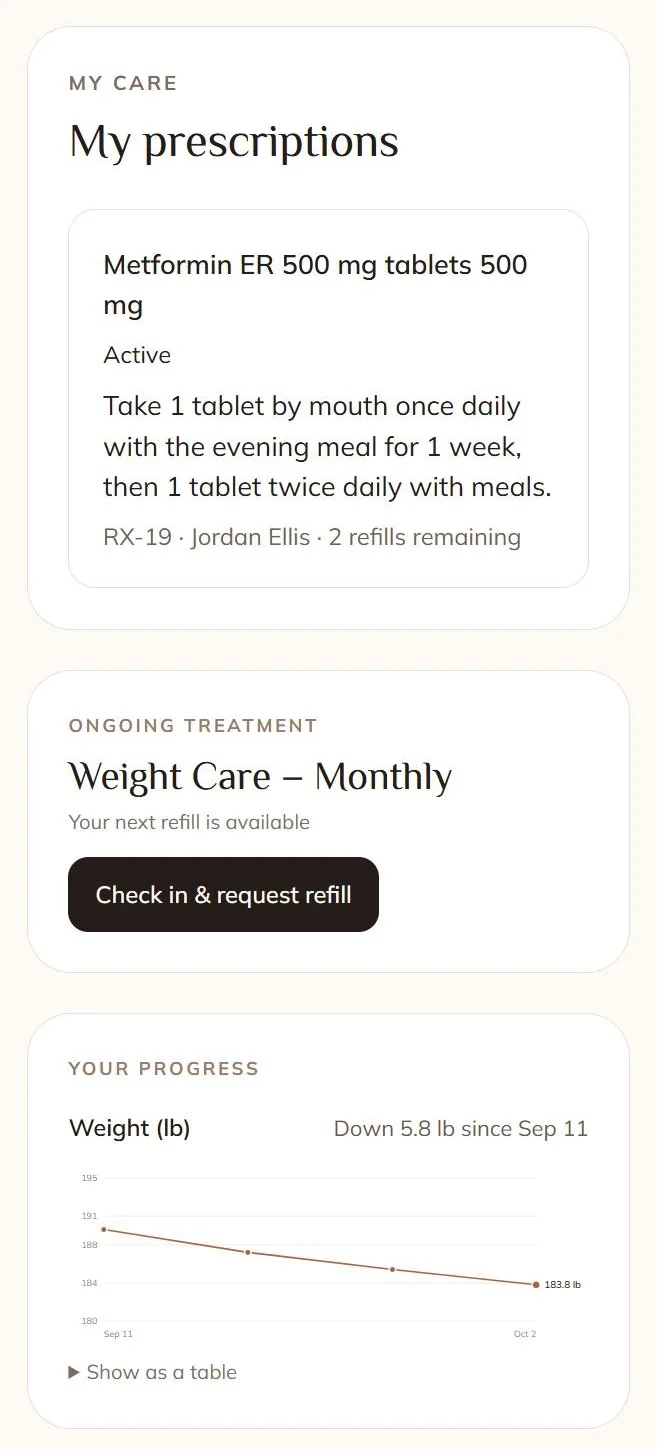
- My prescriptions with dosage instructions, prescriber and refills remaining
- Ongoing treatment plans with a Check in & request refill step
- A progress chart (e.g. weight over time) with a table view
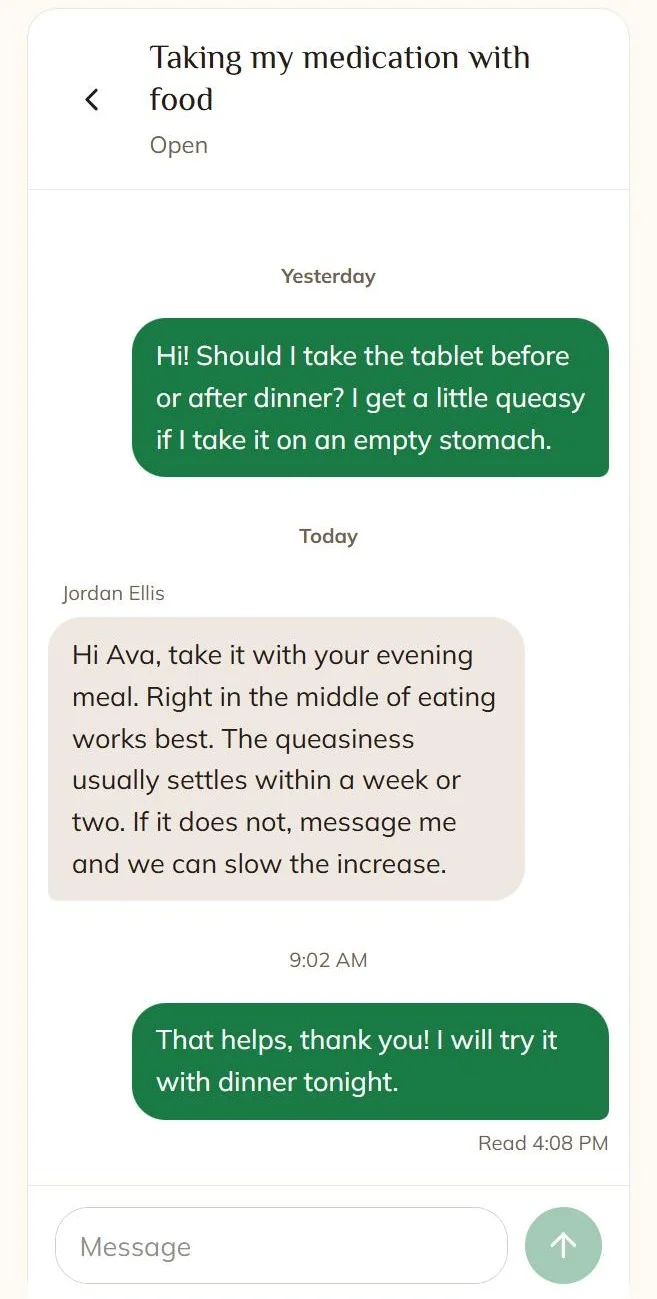
- Secure messaging between the patient and their provider, organised by topic, with read receipts
- Order progress and care steps, according to the seller
Platform
- Multi-tenant structure so several practices can run with separate workspaces and branding
- Role-based workspaces for practice owners, providers, pharmacies, laboratories and patients
- A Success Center for onboarding and educational resources and a Network area for partner discovery
- Earnings sections in the practice, pharmacy and lab workspaces
Who it is for
- Wellness practices and provider groups that want to own their care-coordination software instead of renting it
- Compounding and mail-order pharmacies building a network of prescribing practices
- Healthcare operators and telehealth brands launching weight care, hormone or men's health programs
- Software companies that want to sell a white-label practice management SaaS
How it works
- A patient request or order starts a case at a practice.
- The patient completes intake and the required consents.
- The case enters the provider review queue, where eligibility is checked by state and a provider claims it.
- The provider requests more information, arranges a visit or records a decision.
- Approved prescriptions go to the pharmacy to verify, fill and ship; lab work goes to the lab as a requisition.
- The patient follows prescriptions, refills, messages and order progress in the portal.
Ways to monetize
A buyer could charge practices a monthly SaaS subscription per workspace or per provider, take a platform fee on orders routed to partner pharmacies and labs, sell white-label instances to telehealth brands, or run the platform as the operating system for their own practice network.
Technology
React · TypeScript · Supabase (authentication, database and backend functions) · PostgreSQL
What you get
- Frontend source code (React and TypeScript) for every workspace
- Database schemas and backend function exports from Supabase
- Branding materials and technical documentation
- Demonstration workflows with fictional sample data
- 30 days of seller support
Good to know
- Pre-launch. The seller describes Bare Health as pre-launch, with demonstration workflows and fictional sample data. There are no patients, practices or revenue on it yet.
- Not ready for real patients. The seller states that production testing, security review, integration validation and operational setup still need to be completed before real-patient use.
- Regulation. No HIPAA or other compliance certification is claimed. Handling patient health information, e-prescribing and state licensing rules are the buyer's responsibility to review with counsel.
- Hosting. The seller reports the frontend is currently hosted through ChatGPT Sites, with the backend in Supabase. Plan to move it to your own hosting and your own Supabase project.
- Integrations. Third-party connections and deployment configuration will be reviewed during due diligence. Confirm with the seller which (if any) pharmacy, lab, payment or video services are connected.
- Handover. Final asset-transfer and handover terms are agreed with the buyer.
What's included
- Admin Panel
Documentation
The intended care journey begins with a patient request or order, followed by intake and required consents. The case moves into provider review, where the provider can request more information, arrange a visit, or record a clinical decision. Approved treatment workflows can proceed to pharmacy fulfillment, while laboratory workflows track requests and results. The patient portal provides visibility into care steps, messages, and order progress.
The frontend is currently hosted through ChatGPT Sites, with backend services maintained separately in Supabase. Third-party connections, deployment configuration, and remaining production requirements would be reviewed during technical due diligence and buyer handover.
Support
Included: 30 days
Contact the publisher
Reviews
No reviews yet.